> ## Documentation Index
> Fetch the complete documentation index at: https://cockroachlabs.mintlify.site/llms.txt
> Use this file to discover all available pages before exploring further.
# Jobs Page
export const InternalLink = ({version, path = "", children, ...props}) => {
let detectedVersion = version || "stable";
if (typeof window !== 'undefined' && !version) {
const match = window.location.pathname.match(/\/docs\/([^/]+)/);
if (match) {
detectedVersion = match[1];
}
}
const normalizedPath = path.startsWith("/") ? path.slice(1) : path;
return
{children}
;
};
The **Jobs** page of the CockroachDB Cloud Console provides details of all jobs in the cluster.
Viewing jobs requires the Cluster Monitor, Cluster Operator, or Cluster Admin role. To view this page, select a cluster from the **Clusters** page, and click **Jobs** in the **Monitoring** section of the left side navigation.
By default, jobs are deleted every 14 days. You can change this interval using the `jobs.retention_time` cluster setting.
The Jobs list is designed for you to manage pending work. It is not intended to display the canonical record of all jobs that have run. If you need a historical record of all jobs you have run, you should log this information externally.
## Jobs table
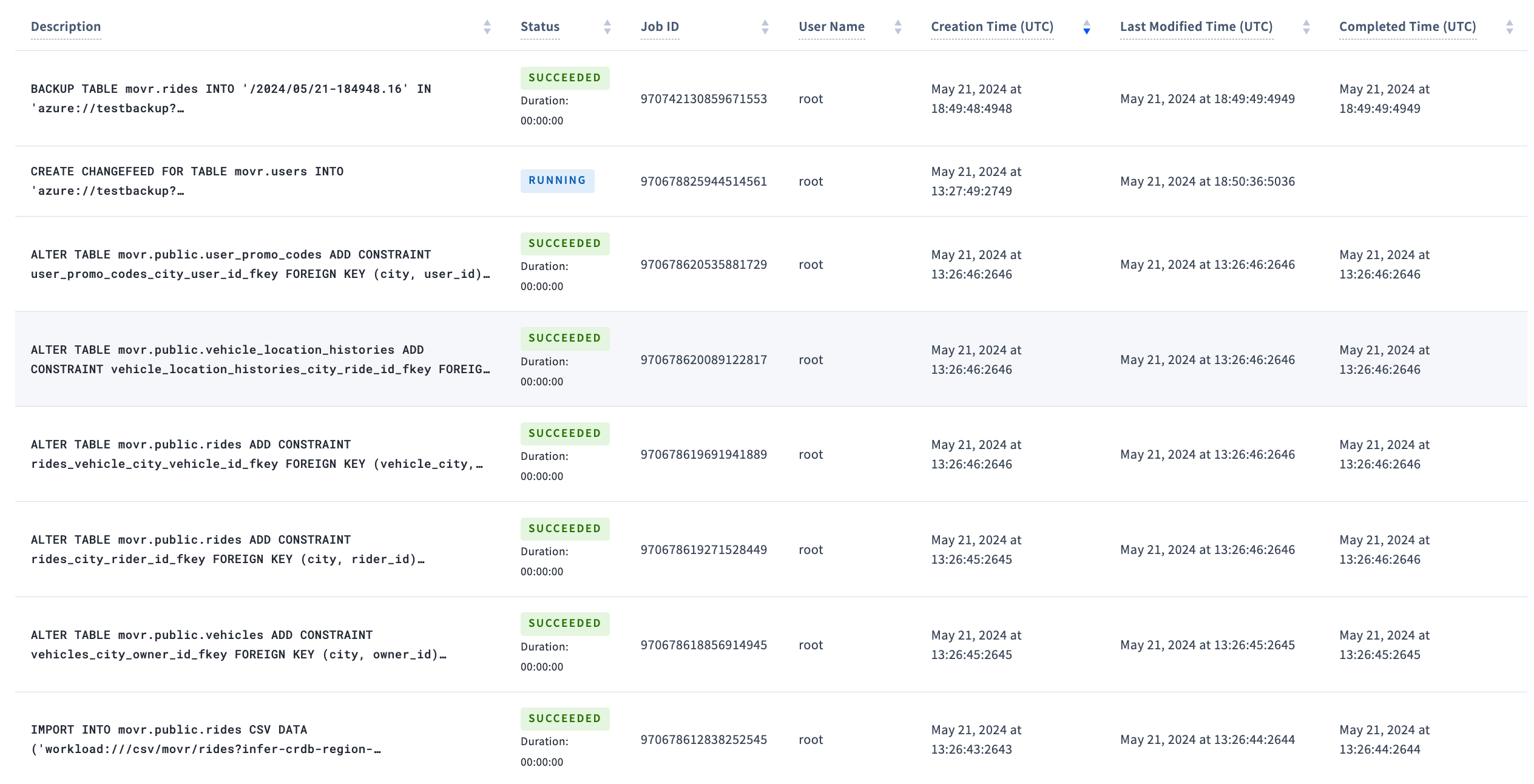
Use the **Jobs** table to see recently created and completed jobs.
 ### Filter jobs
Use the controls to filter jobs:
* **Status**: filter jobs by [job status](#job-status).
* **Type**: filter jobs by type. Automatic table statistics jobs are not displayed even when the **Type** menu is set to **All**. To view these jobs, set **Type** to **Auto-Statistics Creation**.
* **Show**: toggle between showing the latest 50 jobs or all jobs.
The status line after the filters shows the number of jobs displayed and a message indicating the oldest time (in UTC) that jobs are shown for. The oldest time is calculated as `now -` the duration of the `jobs.retention_time` cluster setting, set to 28 days by default.
The table is paginated with 20 jobs per page. Click the page controls following the table to traverse pages.
The following columns are available for each job. Click **Columns** to select the columns to display in the table.
| Column | Description |
| ------------------------ | ------------------------------------------------------------------------------------------------------------------------------------------------------------------------------------------------------------------------------------------------------------------ |
| Description | SQL statement that created the job. |
| Status | Current [job status](#job-status) or completion progress. |
| Job ID | Unique job ID. This value is used to pause, resume, or cancel jobs. |
| User Name | User that created the job. |
| Creation Time (UTC) | Date and time the job was created. |
| Last Modified Time (UTC) | Date and time the job was last modified. |
| Completed Time (UTC) | Date and time the job was completed. |
To view [job details](#job-details), click the job description.
### Job status
| Status | Description |
| ------------------ | ----------------------------------------------------------------------------------------------------------------------------------------- |
| `PENDING` | Job is created but has not started running. |
| `PAUSED` | Job is paused. |
| `PAUSE-REQUESTED` | A request has been issued to pause the job. The status will move to `PAUSED` when the node running the job registers the request. |
| `FAILED` | Job failed to complete. |
| `SUCCEEDED` | Job successfully completed. |
| `CANCELED` | Job was canceled. |
| `CANCEL-REQUESTED` | A request has been issued to cancel the job. The status will move to `CANCELED` when the node running the job registers the request. |
| `RUNNING` | Job is running. A job that is running will be displayed with its percent completion and time remaining, rather than the `RUNNING` status. |
| `REVERTING` | Job failed or was canceled and its changes are being reverted. |
| `REVERT-FAILED` | Job encountered a non-retryable error when reverting the changes. It is necessary to manually clean up a job with this status. |
| `RETRYING` | Job is retrying another job that failed. |
## Job details
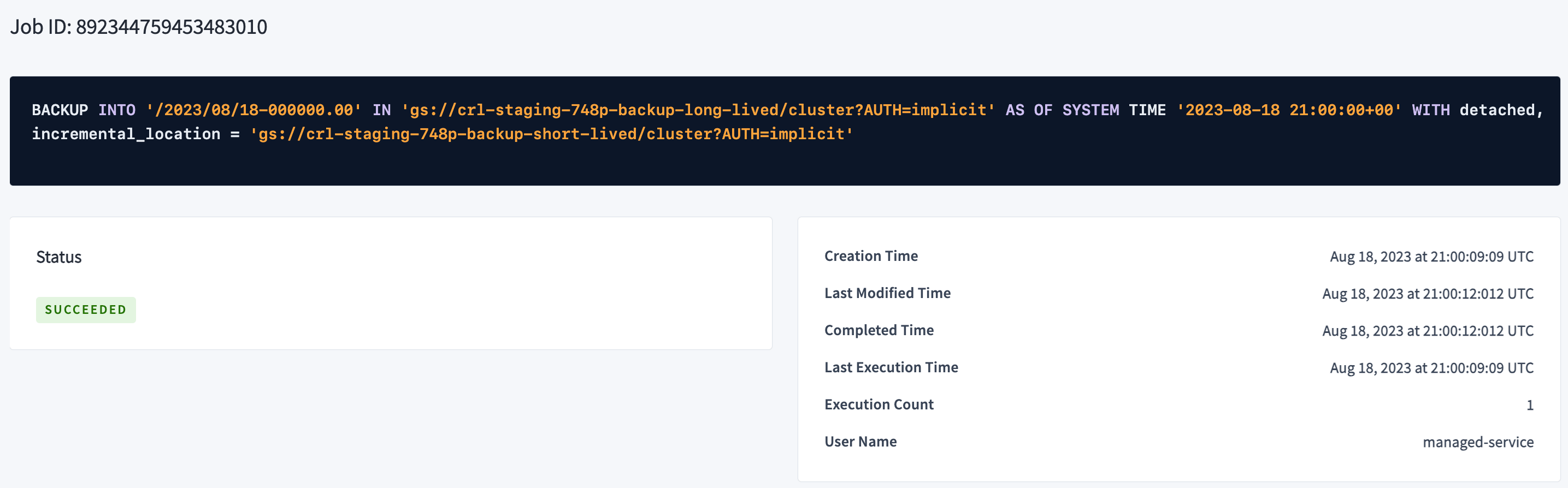
The details show:
* **Job ID**
* **Status**
* **Creation Time**
* **Last Modified Time**
* **Completed Time**
* **Last Execution Time**
* **Execution Count**
* **User Name**
* error messages (if any)
### Filter jobs
Use the controls to filter jobs:
* **Status**: filter jobs by [job status](#job-status).
* **Type**: filter jobs by type. Automatic table statistics jobs are not displayed even when the **Type** menu is set to **All**. To view these jobs, set **Type** to **Auto-Statistics Creation**.
* **Show**: toggle between showing the latest 50 jobs or all jobs.
The status line after the filters shows the number of jobs displayed and a message indicating the oldest time (in UTC) that jobs are shown for. The oldest time is calculated as `now -` the duration of the `jobs.retention_time` cluster setting, set to 28 days by default.
The table is paginated with 20 jobs per page. Click the page controls following the table to traverse pages.
The following columns are available for each job. Click **Columns** to select the columns to display in the table.
| Column | Description |
| ------------------------ | ------------------------------------------------------------------------------------------------------------------------------------------------------------------------------------------------------------------------------------------------------------------ |
| Description | SQL statement that created the job. |
| Status | Current [job status](#job-status) or completion progress. |
| Job ID | Unique job ID. This value is used to pause, resume, or cancel jobs. |
| User Name | User that created the job. |
| Creation Time (UTC) | Date and time the job was created. |
| Last Modified Time (UTC) | Date and time the job was last modified. |
| Completed Time (UTC) | Date and time the job was completed. |
To view [job details](#job-details), click the job description.
### Job status
| Status | Description |
| ------------------ | ----------------------------------------------------------------------------------------------------------------------------------------- |
| `PENDING` | Job is created but has not started running. |
| `PAUSED` | Job is paused. |
| `PAUSE-REQUESTED` | A request has been issued to pause the job. The status will move to `PAUSED` when the node running the job registers the request. |
| `FAILED` | Job failed to complete. |
| `SUCCEEDED` | Job successfully completed. |
| `CANCELED` | Job was canceled. |
| `CANCEL-REQUESTED` | A request has been issued to cancel the job. The status will move to `CANCELED` when the node running the job registers the request. |
| `RUNNING` | Job is running. A job that is running will be displayed with its percent completion and time remaining, rather than the `RUNNING` status. |
| `REVERTING` | Job failed or was canceled and its changes are being reverted. |
| `REVERT-FAILED` | Job encountered a non-retryable error when reverting the changes. It is necessary to manually clean up a job with this status. |
| `RETRYING` | Job is retrying another job that failed. |
## Job details
The details show:
* **Job ID**
* **Status**
* **Creation Time**
* **Last Modified Time**
* **Completed Time**
* **Last Execution Time**
* **Execution Count**
* **User Name**
* error messages (if any)
 ## See also
* `SHOW JOBS`
* Troubleshooting Overview
* Support Resources
* Raw Status Endpoints
## See also
* `SHOW JOBS`
* Troubleshooting Overview
* Support Resources
* Raw Status Endpoints