> ## Documentation Index
> Fetch the complete documentation index at: https://cockroachlabs.mintlify.site/llms.txt
> Use this file to discover all available pages before exploring further.
# Sessions Page
export const InternalLink = ({version, path = "", children, ...props}) => {
let detectedVersion = version || "stable";
if (typeof window !== 'undefined' && !version) {
const match = window.location.pathname.match(/\/docs\/([^/]+)/);
if (match) {
detectedVersion = match[1];
}
}
const normalizedPath = path.startsWith("/") ? path.slice(1) : path;
return
{children}
;
};
On a secure cluster, you must be an `admin` user or a SQL user with the `VIEWACTIVITY` or `VIEWACTIVITYREDACTED` system privilege (or the legacy `VIEWACTIVITY` role option). Other users will see only their own sessions. Refer to DB Console security.
The **Sessions** page provides information about open SQL sessions in your cluster, using data in the cluster's `crdb_internal` system catalog. To view it, click **SQL Activity**, then click **Sessions**.
## Sessions table
Use the **Sessions** table to see active, idle, and closed sessions. A session is *active* if it has an open transaction (including implicit transactions, which are individual SQL statements), and *idle* if it has no open transaction. Active sessions consume hardware resources. A session is *closed* if it has closed the connection to CockroachDB.
 To filter the sessions, click the **Filters** field.
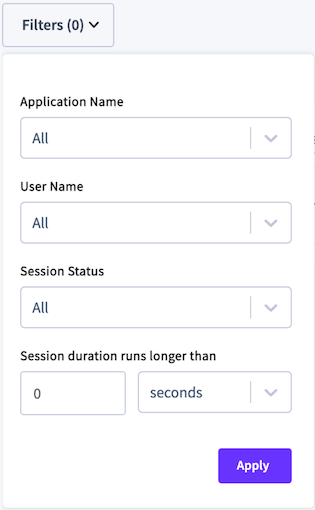 * To filter by application, select **Application Name** and choose one or more applications.
* Queries from the SQL shell are displayed under the `$ cockroach` app.
* If you have not set `application_name` in a client connection string, it appears as `unset`.
* To filter by username or session status, select **User Name** or **Session Status** and check one or more checkboxes.
* To filter by session duration, specify the session time and unit.
Click **Columns** to select the columns to display in the table.
The following properties are displayed for each session:
| Column | Description |
| -------------------------- | -------------------------------------------------------------------------------------------------------------------------------------------------------------------------------------------------------------------------------------------------------------------------------------------------------------------------------------------------------------------------------------------------------------------------------------------------------------------------------------------------------------------------------------------------- |
| Session Start Time (UTC) | The timestamp at which the session started. |
| Session Duration | The amount of time the session has been open. |
| Session Active Duration | The amount of time transactions were executing while the session was open. |
| Status | The status of the session: `Active`, `Idle`, or `Closed`. A session is `Active` if it has an open explicit or implicit transaction (individual SQL statement) with a statement that is actively running or waiting to acquire a lock. A session is `Idle` if it has no open transaction. A session is `Closed` if it has closed the connection to CockroachDB. |
| Most Recent Statement | If more than one statement is executing, the most recent statement. If the session is Idle, the last statement. |
| Statement Start Time (UTC) | The timestamp at which the statement started. |
| Transaction Count | The number of transactions completed in the session. |
| Memory Usage | Amount of memory currently allocated to the session followed by the maximum amount of memory the session has ever been allocated. |
| Client IP Address | The IP address and port of the client that opened the session. |
| User Name | The user that opened the session. |
| Application Name | The application that ran the session. |
| Actions | Options to cancel the active statement and cancel the session. These require the `CANCELQUERY`system privilege (or the legacy `CANCELQUERY`role option. - **Cancel Statement:** Ends the SQL statement. The session running this statement will receive an error. - **Cancel Session:** Ends the session. The client that holds this session will receive a "connection terminated" event. |
To view details of a session, click a **Session Start Time (UTC)** to display session details.
## Session Details
If a session is idle, the **Transaction** and **Most Recent Statement** panels will display **No Active \[Transaction | Statement]**.
* To filter by application, select **Application Name** and choose one or more applications.
* Queries from the SQL shell are displayed under the `$ cockroach` app.
* If you have not set `application_name` in a client connection string, it appears as `unset`.
* To filter by username or session status, select **User Name** or **Session Status** and check one or more checkboxes.
* To filter by session duration, specify the session time and unit.
Click **Columns** to select the columns to display in the table.
The following properties are displayed for each session:
| Column | Description |
| -------------------------- | -------------------------------------------------------------------------------------------------------------------------------------------------------------------------------------------------------------------------------------------------------------------------------------------------------------------------------------------------------------------------------------------------------------------------------------------------------------------------------------------------------------------------------------------------- |
| Session Start Time (UTC) | The timestamp at which the session started. |
| Session Duration | The amount of time the session has been open. |
| Session Active Duration | The amount of time transactions were executing while the session was open. |
| Status | The status of the session: `Active`, `Idle`, or `Closed`. A session is `Active` if it has an open explicit or implicit transaction (individual SQL statement) with a statement that is actively running or waiting to acquire a lock. A session is `Idle` if it has no open transaction. A session is `Closed` if it has closed the connection to CockroachDB. |
| Most Recent Statement | If more than one statement is executing, the most recent statement. If the session is Idle, the last statement. |
| Statement Start Time (UTC) | The timestamp at which the statement started. |
| Transaction Count | The number of transactions completed in the session. |
| Memory Usage | Amount of memory currently allocated to the session followed by the maximum amount of memory the session has ever been allocated. |
| Client IP Address | The IP address and port of the client that opened the session. |
| User Name | The user that opened the session. |
| Application Name | The application that ran the session. |
| Actions | Options to cancel the active statement and cancel the session. These require the `CANCELQUERY`system privilege (or the legacy `CANCELQUERY`role option. - **Cancel Statement:** Ends the SQL statement. The session running this statement will receive an error. - **Cancel Session:** Ends the session. The client that holds this session will receive a "connection terminated" event. |
To view details of a session, click a **Session Start Time (UTC)** to display session details.
## Session Details
If a session is idle, the **Transaction** and **Most Recent Statement** panels will display **No Active \[Transaction | Statement]**.
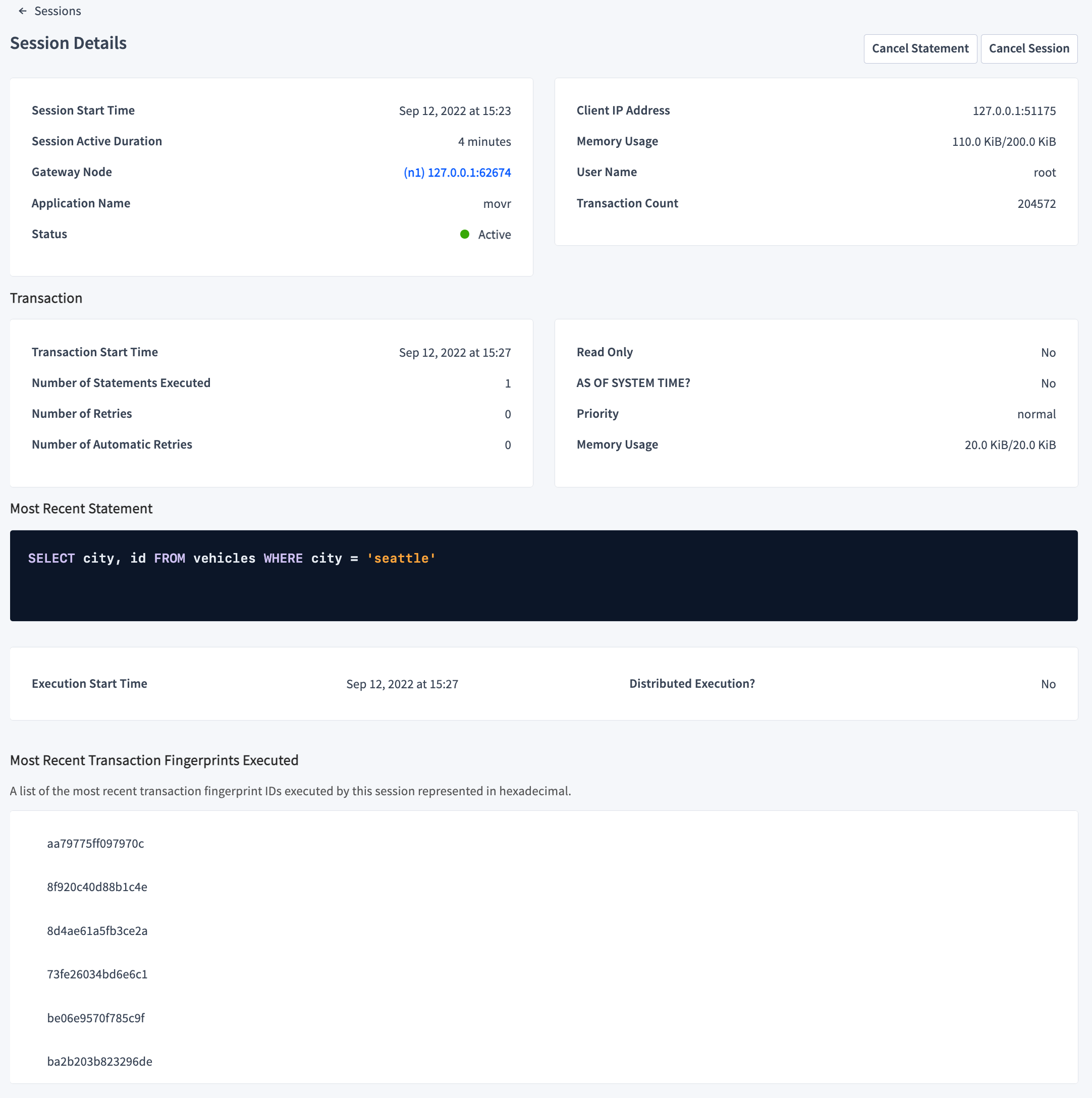 The **Cancel statement** button ends the SQL statement. The session running this statement will receive an error. The **Cancel session** button ends the session. The client that holds this session will receive a "connection terminated" event.
* **Session Details**
* **Session Start Time** shows the timestamp at which the session started.
- **Gateway Node** shows the node ID and IP address/port of the gateway node handling the client connection.
* **Application Name** shows the name of the application connected to the session.
* **Client IP Address** shows the IP address/port of the client that opened the session.
* **Memory Usage** shows the amount of memory currently allocated to this session, followed by the maximum amount of memory this session has ever allocated.
* **User Name** displays the name of the user that started the session.
* **Transaction** displays the following information for an open transaction.
* **Transaction Start Time** shows the timestamp at which the transaction started.
* **Number of Statements Executed** shows the total number of SQL statements executed by the transaction.
* **Number of Retries** shows the total number of retries for the transaction.
* **Number of Automatic Retries** shows the total number of automatic retries run by CockroachDB for the transaction.
* **Read Only?** shows whether the transaction is read-only.
* **AS OF SYSTEM TIME?** shows whether the transaction uses `AS OF SYSTEM TIME` to return historical data.
* **Priority** shows the priority for the transaction.
* **Memory Usage** shows the amount of memory currently allocated to this transaction, followed by the maximum amount of memory this transaction has ever allocated.
* **Most Recent Statement** displays the following information for an active statement.
* The SQL statement.
* **Execution Start Time** is the timestamp at which the statement was run.
* **Distributed Execution?** shows whether the statement uses Distributed SQL (DistSQL) optimization.
* **Most Recent Transaction Fingerprints Executed**
A list of the most recent transaction fingerprint IDs, represented in hexadecimal, executed by this session. The fingerprint ID is a link to the Transaction Details page for the transaction. When you click the link, in order to fetch and render the transaction details, the global date range is changed to the session's start and end time.
### Closed session cache
Details about closed sessions are stored in memory in a closed session cache. This cache is controlled by the following two cluster settings:
* `sql.closed_session_cache.capacity` is the maximum number of sessions in the cache and defaults to `1000`. Once this limit is reached, older sessions are deleted from the cache so newer sessions can be included.
* `sql.closed_session_cache.time_to_live` is the maximum time to live, in seconds, and defaults to `3600`. 60 minutes after a session is closed, it is deleted from the cache.
If the **Session Details** page displays the message `Unable to find session` for a closed session, the details may no longer be available because they were removed from this cache according to the previously mentioned cluster settings.
## See also
* `SHOW SESSIONS`
* Statements page
* SQL Statements
* Transactions
* Transaction Error Retry Reference
* Production Checklist
The **Cancel statement** button ends the SQL statement. The session running this statement will receive an error. The **Cancel session** button ends the session. The client that holds this session will receive a "connection terminated" event.
* **Session Details**
* **Session Start Time** shows the timestamp at which the session started.
- **Gateway Node** shows the node ID and IP address/port of the gateway node handling the client connection.
* **Application Name** shows the name of the application connected to the session.
* **Client IP Address** shows the IP address/port of the client that opened the session.
* **Memory Usage** shows the amount of memory currently allocated to this session, followed by the maximum amount of memory this session has ever allocated.
* **User Name** displays the name of the user that started the session.
* **Transaction** displays the following information for an open transaction.
* **Transaction Start Time** shows the timestamp at which the transaction started.
* **Number of Statements Executed** shows the total number of SQL statements executed by the transaction.
* **Number of Retries** shows the total number of retries for the transaction.
* **Number of Automatic Retries** shows the total number of automatic retries run by CockroachDB for the transaction.
* **Read Only?** shows whether the transaction is read-only.
* **AS OF SYSTEM TIME?** shows whether the transaction uses `AS OF SYSTEM TIME` to return historical data.
* **Priority** shows the priority for the transaction.
* **Memory Usage** shows the amount of memory currently allocated to this transaction, followed by the maximum amount of memory this transaction has ever allocated.
* **Most Recent Statement** displays the following information for an active statement.
* The SQL statement.
* **Execution Start Time** is the timestamp at which the statement was run.
* **Distributed Execution?** shows whether the statement uses Distributed SQL (DistSQL) optimization.
* **Most Recent Transaction Fingerprints Executed**
A list of the most recent transaction fingerprint IDs, represented in hexadecimal, executed by this session. The fingerprint ID is a link to the Transaction Details page for the transaction. When you click the link, in order to fetch and render the transaction details, the global date range is changed to the session's start and end time.
### Closed session cache
Details about closed sessions are stored in memory in a closed session cache. This cache is controlled by the following two cluster settings:
* `sql.closed_session_cache.capacity` is the maximum number of sessions in the cache and defaults to `1000`. Once this limit is reached, older sessions are deleted from the cache so newer sessions can be included.
* `sql.closed_session_cache.time_to_live` is the maximum time to live, in seconds, and defaults to `3600`. 60 minutes after a session is closed, it is deleted from the cache.
If the **Session Details** page displays the message `Unable to find session` for a closed session, the details may no longer be available because they were removed from this cache according to the previously mentioned cluster settings.
## See also
* `SHOW SESSIONS`
* Statements page
* SQL Statements
* Transactions
* Transaction Error Retry Reference
* Production Checklist