> ## Documentation Index
> Fetch the complete documentation index at: https://cockroachlabs.mintlify.site/llms.txt
> Use this file to discover all available pages before exploring further.
# Use IntelliJ IDEA with CockroachDB
export const InternalLink = ({version, path = "", children, ...props}) => {
let detectedVersion = version || "stable";
if (typeof window !== 'undefined' && !version) {
const match = window.location.pathname.match(/\/docs\/([^/]+)/);
if (match) {
detectedVersion = match[1];
}
}
const normalizedPath = path.startsWith("/") ? path.slice(1) : path;
return
{children}
;
};
You can use CockroachDB in [IntelliJ IDEA](https://www.jetbrains.com/idea) as a [database data source](https://www.jetbrains.com/help/idea/managing-data-sources#data_sources), which lets you accomplish tasks like managing your database's schema from within your IDE.
## Support
As of CockroachDB v24.3, IntelliJ IDEA only has **partial support**. This means that the application is mostly functional, but its integration still has a few rough edges.
### Versions
The level of support in this document was tested as of the following versions:
* CockroachDB v19.1.0-beta.20190225
* IntelliJ IDEA Ultimate 18.1.3
* PostgreSQL JDBC 41.1
This feature should also work with other JetBrains IDEs, such as PyCharm, but Cockroach Labs has not yet tested its integration.
### Warnings and errors
Users can expect to encounter the following behaviors when using CockroachDB within IntelliJ IDEA.
* **Warnings** do not require any action on the user's end and can be ignored. Note that even if a message indicates that it is an "error", it can still be treated as a warning by this definition.
* **Errors** require the user to take action to resolve the problem and cannot be ignored.
#### Warnings
##### \[XXUUU] ERROR: could not decorrelate subquery
 Displays once per load of schema.
***
##### \[42883] ERROR: unknown function: pg\_function\_is\_visible() Failed to retrieve
Displays once per load of schema.
***
##### \[42883] ERROR: unknown function: pg\_function\_is\_visible() Failed to retrieve
 Display periodically. Does not impact functionality.
#### Errors
##### \[42703] org.postgresql.util.PSQLException: ERROR: column "n.xmin" does not exist
Display periodically. Does not impact functionality.
#### Errors
##### \[42703] org.postgresql.util.PSQLException: ERROR: column "n.xmin" does not exist
 Requires setting **Introspect using JDBC metadata** ([details below](#set-cockroachdb-as-a-data-source-in-intellij)).
***
## Set CockroachDB as a data source in IntelliJ
1. Launch the **Database** tool window. ( **View** > **Tool Windows** > **Database** )
Requires setting **Introspect using JDBC metadata** ([details below](#set-cockroachdb-as-a-data-source-in-intellij)).
***
## Set CockroachDB as a data source in IntelliJ
1. Launch the **Database** tool window. ( **View** > **Tool Windows** > **Database** )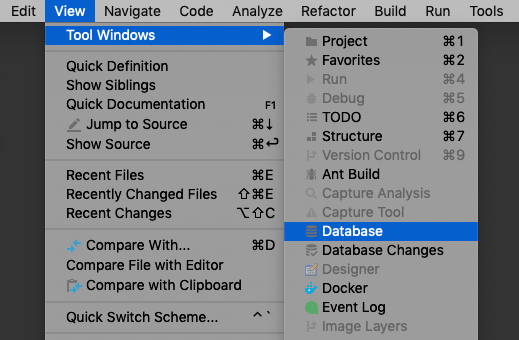 2. Add a PostgreSQL data source. ( **New (+)** > **Data Source** > **PostgreSQL** )
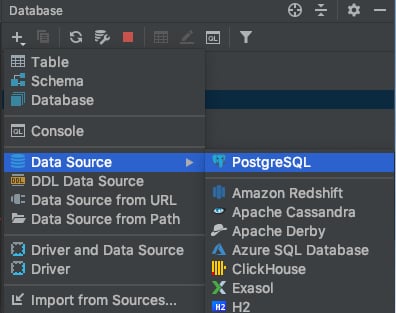 3. On the **General** tab, enter your database's connection string:
| Field | Value |
| ------------ | ---------------------------------------------------------------------------------------------------------------------------------------------------------------------------------------------------------------------------------------- |
| **Host** | Your CockroachDB cluster's hostname |
| **Port** | Your CockroachDB cluster's port. By default, CockroachDB uses port **26257**. |
| **Database** | The database you want to connect to. Note that CockroachDB's notion of database differs from PostgreSQL's; you can see your cluster's databases through the `SHOW DATABASES` command. |
| **User** | The user to connect as. By default, you can use **root**. |
| **Password** | If your cluster uses password authentication, enter the password. |
| **Driver** | Select or install **PostgreSQL** using a version greater than or equal to 41.1. (Older drivers have not been tested.) |
3. On the **General** tab, enter your database's connection string:
| Field | Value |
| ------------ | ---------------------------------------------------------------------------------------------------------------------------------------------------------------------------------------------------------------------------------------- |
| **Host** | Your CockroachDB cluster's hostname |
| **Port** | Your CockroachDB cluster's port. By default, CockroachDB uses port **26257**. |
| **Database** | The database you want to connect to. Note that CockroachDB's notion of database differs from PostgreSQL's; you can see your cluster's databases through the `SHOW DATABASES` command. |
| **User** | The user to connect as. By default, you can use **root**. |
| **Password** | If your cluster uses password authentication, enter the password. |
| **Driver** | Select or install **PostgreSQL** using a version greater than or equal to 41.1. (Older drivers have not been tested.) |
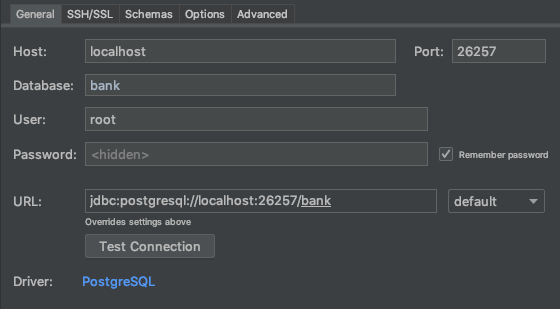 4. Install or select a **PostgreSQL** driver. We recommend a version greater than or equal to 41.1.
5. If your cluster uses SSL authentication, go to the **SSH/SSL** tab, select **Use SSL** and provide the location of your certificate files.
6. Go to the **Options** tab, and then select **Introspect using JDBC metadata**.
4. Install or select a **PostgreSQL** driver. We recommend a version greater than or equal to 41.1.
5. If your cluster uses SSL authentication, go to the **SSH/SSL** tab, select **Use SSL** and provide the location of your certificate files.
6. Go to the **Options** tab, and then select **Introspect using JDBC metadata**.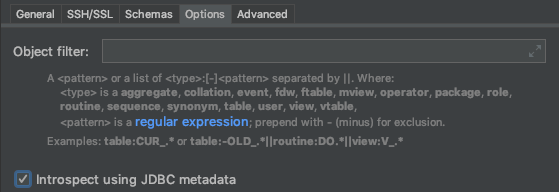 7. Click **OK**.
You can now use IntelliJ's [database tool window](https://www.jetbrains.com/help/idea/working-with-the-database-tool-window) to interact with your CockroachDB cluster.
## Report issues with IntelliJ IDEA & CockroachDB
If you encounter issues other than those outlined above, please contact Support with the following details about the environment where you encountered the issue:
* CockroachDB version ( `cockroach version` )
* IntelliJ IDEA version
* Operating system
* Steps to reproduce the behavior
* If possible, a trace of the SQL statements sent to CockroachDB while the error is being reproduced using SQL query logging.
## See also
* Client connection parameters
* Third-Party Database Tools
7. Click **OK**.
You can now use IntelliJ's [database tool window](https://www.jetbrains.com/help/idea/working-with-the-database-tool-window) to interact with your CockroachDB cluster.
## Report issues with IntelliJ IDEA & CockroachDB
If you encounter issues other than those outlined above, please contact Support with the following details about the environment where you encountered the issue:
* CockroachDB version ( `cockroach version` )
* IntelliJ IDEA version
* Operating system
* Steps to reproduce the behavior
* If possible, a trace of the SQL statements sent to CockroachDB while the error is being reproduced using SQL query logging.
## See also
* Client connection parameters
* Third-Party Database Tools