> ## Documentation Index
> Fetch the complete documentation index at: https://cockroachlabs.mintlify.site/llms.txt
> Use this file to discover all available pages before exploring further.
# MovR
export const InternalLink = ({version, path = "", children, ...props}) => {
let detectedVersion = version || "stable";
if (typeof window !== 'undefined' && !version) {
const match = window.location.pathname.match(/\/docs\/([^/]+)/);
if (match) {
detectedVersion = match[1];
}
}
const normalizedPath = path.startsWith("/") ? path.slice(1) : path;
return
{children}
;
};
MovR is a fictional vehicle-sharing company created to demonstrate CockroachDB's features.
## Overview
The MovR example consists of the following:
* The `movr` dataset, which contains rows of data that populate tables in the `movr` database. The `movr` dataset is built into `cockroach demo` and `cockroach workload`.
* The MovR application, a fully-functional vehicle-sharing application, written in Python. All of MovR application source code is open-source, and available on the [movr](https://github.com/cockroachdb/movr) GitHub repository.
## The `movr` database
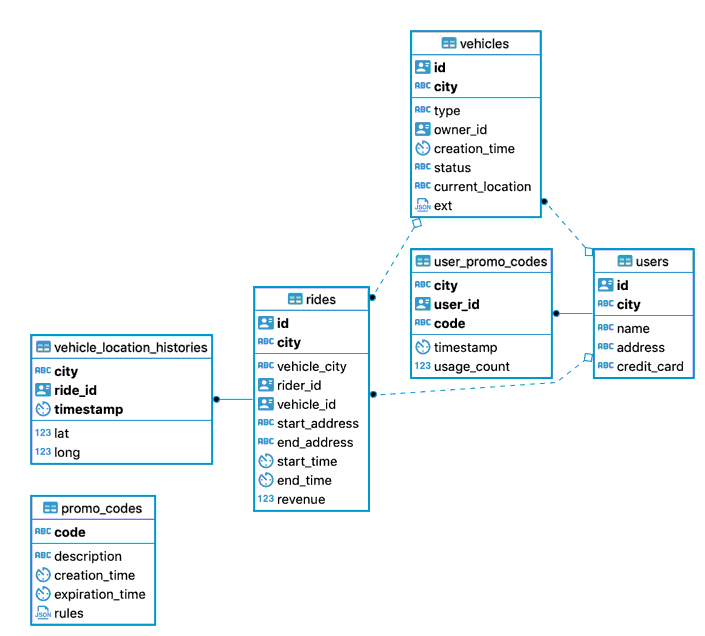
The six tables in the `movr` database store user, vehicle, and ride data for MovR:
| Table | Description |
| ------------------------------ | ----------------------------------------------- |
| `users` | People registered for the service. |
| `vehicles` | The pool of vehicles available for the service. |
| `rides` | When and where users have rented a vehicle. |
| `promo\_codes` | Promotional codes for users. |
| `user\_promo\_codes` | Promotional codes in use by users. |
| `vehicle\_location\_histories` | Vehicle location history. |
 ## Generating schemas and data for MovR
You can use the `cockroach demo` and `cockroach workload` commands to load the `movr` database and dataset into a CockroachDB cluster.
`cockroach demo` opens a SQL shell to a temporary, in-memory cluster. To open a SQL shell to a demo cluster with the `movr` database preloaded and set as the current database, use the following command:
```shell theme={"theme":{"light":"catppuccin-mocha","dark":"catppuccin-mocha"}}
$ cockroach demo movr
```
`cockroach workload` loads sample datasets and workloads into running clusters. To load the `movr` database and some sample data into a running cluster, do the following:
1. Start a secure or insecure local cluster.
2. Use `cockroach workload` to load the `movr` dataset:
```shell Secure theme={"theme":{"light":"catppuccin-mocha","dark":"catppuccin-mocha"}}
$ cockroach workload init movr 'postgresql://root@localhost:26257?sslcert=certs%2Fclient.root.crt&sslkey=certs%2Fclient.root.key&sslmode=verify-full&sslrootcert=certs%2Fca.crt'
```
```shell Insecure theme={"theme":{"light":"catppuccin-mocha","dark":"catppuccin-mocha"}}
$ cockroach workload init movr 'postgresql://root@localhost:26257?sslmode=disable'
```
3. Use `cockroach sql` to open an interactive SQL shell and set `movr` as the current database:
```shell theme={"theme":{"light":"catppuccin-mocha","dark":"catppuccin-mocha"}}
$ cockroach sql --certs-dir=certs --host=localhost:26257
```
```sql theme={"theme":{"light":"catppuccin-mocha","dark":"catppuccin-mocha"}}
> USE movr;
```
4. Use `cockroach sql` to open an interactive SQL shell and set `movr` as the current database:
```shell theme={"theme":{"light":"catppuccin-mocha","dark":"catppuccin-mocha"}}
$ cockroach sql --insecure --host=localhost:26257
```
```sql theme={"theme":{"light":"catppuccin-mocha","dark":"catppuccin-mocha"}}
> USE movr;
```
## How the MovR application works
The workflow for MovR is as follows:
1. A user loads the app and sees the 25 closest vehicles.
For example:
```sql theme={"theme":{"light":"catppuccin-mocha","dark":"catppuccin-mocha"}}
> SELECT id, city, status FROM vehicles WHERE city='amsterdam' limit 25;
```
2. The user signs up for the service.
For example:
```sql theme={"theme":{"light":"catppuccin-mocha","dark":"catppuccin-mocha"}}
> INSERT INTO users (id, name, address, city, credit_card)
VALUES ('66666666-6666-4400-8000-00000000000f', 'Mariah Lam', '88194 Angela Gardens Suite 60', 'amsterdam', '123245696');
```
Usually for Universally Unique Identifier (UUID) you would need to generate it automatically but for the sake of this follow up we will use predetermined UUID to keep track of them in our examples.
3. In some cases, the user adds their own vehicle to share.
For example:
```sql theme={"theme":{"light":"catppuccin-mocha","dark":"catppuccin-mocha"}}
> INSERT INTO vehicles (id, city, type, owner_id,creation_time,status, current_location, ext)
VALUES ('ffffffff-ffff-4400-8000-00000000000f', 'amsterdam', 'skateboard', '66666666-6666-4400-8000-00000000000f', current_timestamp(), 'available', '88194 Angela Gardens Suite 60', '{"color": "blue"}');
```
4. More often, the user reserves a vehicle and starts a ride, applying a promo code, if available and valid.
For example:
```sql theme={"theme":{"light":"catppuccin-mocha","dark":"catppuccin-mocha"}}
> SELECT code FROM user_promo_codes WHERE user_id ='66666666-6666-4400-8000-00000000000f';
```
```sql theme={"theme":{"light":"catppuccin-mocha","dark":"catppuccin-mocha"}}
> UPDATE vehicles SET status = 'in_use' WHERE id='bbbbbbbb-bbbb-4800-8000-00000000000b';
```
```sql theme={"theme":{"light":"catppuccin-mocha","dark":"catppuccin-mocha"}}
> INSERT INTO rides (id, city, vehicle_city, rider_id, vehicle_id, start_address,end_address, start_time, end_time, revenue)
VALUES ('cd032f56-cf1a-4800-8000-00000000066f', 'amsterdam', 'amsterdam', '66666666-6666-4400-8000-00000000000f', 'bbbbbbbb-bbbb-4800-8000-00000000000b', '70458 Mary Crest', '', TIMESTAMP '2020-10-01 10:00:00.123456', NULL, 0.0);
```
5. During the ride, MovR tracks the location of the vehicle.
For example:
```sql theme={"theme":{"light":"catppuccin-mocha","dark":"catppuccin-mocha"}}
> INSERT INTO vehicle_location_histories (city, ride_id, timestamp, lat, long)
VALUES ('amsterdam', 'cd032f56-cf1a-4800-8000-00000000066f', current_timestamp(), -101, 60);
```
6. The user ends the ride and releases the vehicle.
For example:
```sql theme={"theme":{"light":"catppuccin-mocha","dark":"catppuccin-mocha"}}
> UPDATE vehicles SET status = 'available' WHERE id='bbbbbbbb-bbbb-4800-8000-00000000000b';
```
```sql theme={"theme":{"light":"catppuccin-mocha","dark":"catppuccin-mocha"}}
> UPDATE rides SET end_address ='33862 Charles Junctions Apt. 49', end_time=TIMESTAMP '2020-10-01 10:30:00.123456', revenue=88.6
WHERE id='cd032f56-cf1a-4800-8000-00000000066f';
```
## Extended examples
For a tutorial on running MovR against a multi-region cluster, using two important multi-region data topologies to get very low latency reads and writes, see Low Latency, Multi-Region Deployment.
### Develop and deploy a global application
For a tutorial on developing and deploying a globally-available web application for MovR, use the following docs:
1. MovR: A Global Application Use-case
2. Create a Multi-region Database Schema
3. Set up a Virtual Environment for Developing Global Applications
4. Develop a Global Application
5. Deploy a Global Application
## See also
* Learn CockroachDB SQL
* Build an App with CockroachDB
* Features in Preview
## Generating schemas and data for MovR
You can use the `cockroach demo` and `cockroach workload` commands to load the `movr` database and dataset into a CockroachDB cluster.
`cockroach demo` opens a SQL shell to a temporary, in-memory cluster. To open a SQL shell to a demo cluster with the `movr` database preloaded and set as the current database, use the following command:
```shell theme={"theme":{"light":"catppuccin-mocha","dark":"catppuccin-mocha"}}
$ cockroach demo movr
```
`cockroach workload` loads sample datasets and workloads into running clusters. To load the `movr` database and some sample data into a running cluster, do the following:
1. Start a secure or insecure local cluster.
2. Use `cockroach workload` to load the `movr` dataset:
```shell Secure theme={"theme":{"light":"catppuccin-mocha","dark":"catppuccin-mocha"}}
$ cockroach workload init movr 'postgresql://root@localhost:26257?sslcert=certs%2Fclient.root.crt&sslkey=certs%2Fclient.root.key&sslmode=verify-full&sslrootcert=certs%2Fca.crt'
```
```shell Insecure theme={"theme":{"light":"catppuccin-mocha","dark":"catppuccin-mocha"}}
$ cockroach workload init movr 'postgresql://root@localhost:26257?sslmode=disable'
```
3. Use `cockroach sql` to open an interactive SQL shell and set `movr` as the current database:
```shell theme={"theme":{"light":"catppuccin-mocha","dark":"catppuccin-mocha"}}
$ cockroach sql --certs-dir=certs --host=localhost:26257
```
```sql theme={"theme":{"light":"catppuccin-mocha","dark":"catppuccin-mocha"}}
> USE movr;
```
4. Use `cockroach sql` to open an interactive SQL shell and set `movr` as the current database:
```shell theme={"theme":{"light":"catppuccin-mocha","dark":"catppuccin-mocha"}}
$ cockroach sql --insecure --host=localhost:26257
```
```sql theme={"theme":{"light":"catppuccin-mocha","dark":"catppuccin-mocha"}}
> USE movr;
```
## How the MovR application works
The workflow for MovR is as follows:
1. A user loads the app and sees the 25 closest vehicles.
For example:
```sql theme={"theme":{"light":"catppuccin-mocha","dark":"catppuccin-mocha"}}
> SELECT id, city, status FROM vehicles WHERE city='amsterdam' limit 25;
```
2. The user signs up for the service.
For example:
```sql theme={"theme":{"light":"catppuccin-mocha","dark":"catppuccin-mocha"}}
> INSERT INTO users (id, name, address, city, credit_card)
VALUES ('66666666-6666-4400-8000-00000000000f', 'Mariah Lam', '88194 Angela Gardens Suite 60', 'amsterdam', '123245696');
```
Usually for Universally Unique Identifier (UUID) you would need to generate it automatically but for the sake of this follow up we will use predetermined UUID to keep track of them in our examples.
3. In some cases, the user adds their own vehicle to share.
For example:
```sql theme={"theme":{"light":"catppuccin-mocha","dark":"catppuccin-mocha"}}
> INSERT INTO vehicles (id, city, type, owner_id,creation_time,status, current_location, ext)
VALUES ('ffffffff-ffff-4400-8000-00000000000f', 'amsterdam', 'skateboard', '66666666-6666-4400-8000-00000000000f', current_timestamp(), 'available', '88194 Angela Gardens Suite 60', '{"color": "blue"}');
```
4. More often, the user reserves a vehicle and starts a ride, applying a promo code, if available and valid.
For example:
```sql theme={"theme":{"light":"catppuccin-mocha","dark":"catppuccin-mocha"}}
> SELECT code FROM user_promo_codes WHERE user_id ='66666666-6666-4400-8000-00000000000f';
```
```sql theme={"theme":{"light":"catppuccin-mocha","dark":"catppuccin-mocha"}}
> UPDATE vehicles SET status = 'in_use' WHERE id='bbbbbbbb-bbbb-4800-8000-00000000000b';
```
```sql theme={"theme":{"light":"catppuccin-mocha","dark":"catppuccin-mocha"}}
> INSERT INTO rides (id, city, vehicle_city, rider_id, vehicle_id, start_address,end_address, start_time, end_time, revenue)
VALUES ('cd032f56-cf1a-4800-8000-00000000066f', 'amsterdam', 'amsterdam', '66666666-6666-4400-8000-00000000000f', 'bbbbbbbb-bbbb-4800-8000-00000000000b', '70458 Mary Crest', '', TIMESTAMP '2020-10-01 10:00:00.123456', NULL, 0.0);
```
5. During the ride, MovR tracks the location of the vehicle.
For example:
```sql theme={"theme":{"light":"catppuccin-mocha","dark":"catppuccin-mocha"}}
> INSERT INTO vehicle_location_histories (city, ride_id, timestamp, lat, long)
VALUES ('amsterdam', 'cd032f56-cf1a-4800-8000-00000000066f', current_timestamp(), -101, 60);
```
6. The user ends the ride and releases the vehicle.
For example:
```sql theme={"theme":{"light":"catppuccin-mocha","dark":"catppuccin-mocha"}}
> UPDATE vehicles SET status = 'available' WHERE id='bbbbbbbb-bbbb-4800-8000-00000000000b';
```
```sql theme={"theme":{"light":"catppuccin-mocha","dark":"catppuccin-mocha"}}
> UPDATE rides SET end_address ='33862 Charles Junctions Apt. 49', end_time=TIMESTAMP '2020-10-01 10:30:00.123456', revenue=88.6
WHERE id='cd032f56-cf1a-4800-8000-00000000066f';
```
## Extended examples
For a tutorial on running MovR against a multi-region cluster, using two important multi-region data topologies to get very low latency reads and writes, see Low Latency, Multi-Region Deployment.
### Develop and deploy a global application
For a tutorial on developing and deploying a globally-available web application for MovR, use the following docs:
1. MovR: A Global Application Use-case
2. Create a Multi-region Database Schema
3. Set up a Virtual Environment for Developing Global Applications
4. Develop a Global Application
5. Deploy a Global Application
## See also
* Learn CockroachDB SQL
* Build an App with CockroachDB
* Features in Preview