> ## Documentation Index
> Fetch the complete documentation index at: https://cockroachlabs.mintlify.site/llms.txt
> Use this file to discover all available pages before exploring further.
# Regional Tables
export const InternalLink = ({version, path = "", children, ...props}) => {
let detectedVersion = version || "stable";
if (typeof window !== 'undefined' && !version) {
const match = window.location.pathname.match(/\/docs\/([^/]+)/);
if (match) {
detectedVersion = match[1];
}
}
const normalizedPath = path.startsWith("/") ? path.slice(1) : path;
return
{children}
;
};
In a multi-region deployment, regional table locality is a good choice for tables with the following requirements:
* Read and write latency must be low.
* Rows in the table, and all latency-sensitive queries, can be tied to specific regions.
Tables with regional table locality can survive zone or region failures, depending on the database-level survival goal setting.
For new clusters using the multi-region SQL abstractions, Cockroach Labs recommends lowering the `--max-offset` setting to `250ms`. This setting is especially helpful for lowering the write latency of global tables. Nodes can run with different values for `--max-offset`, but only for the purpose of updating the setting across the cluster using a rolling upgrade.
## Before you begin
### Fundamentals
Multi-region patterns require thinking about the following questions:
* What are your survival goals? Do you need to survive a zone failure? Do you need to survive a region failure?
* What are the table localities that will provide the performance characteristics you need for each table's data?
* Do you need low-latency reads and writes from a single region? Do you need that single region to be configurable at the row level? Or will a single optimized region for the entire table suffice?
* Do you have a "read-mostly" table of reference data that is rarely updated, but that must be read with low latency from all regions?
For more information about CockroachDB multi-region capabilities, review the following pages:
* Multi-Region Capabilities Overview
* How to Choose a Multi-Region Configuration
* When to use `ZONE` vs. `REGION` Survival Goals
* When to use `REGIONAL` vs. `GLOBAL` Tables
In addition, reviewing the following information will be helpful:
* The concept of locality, which CockroachDB uses to place and balance data based on how you define survival goal and table locality settings.
* The recommendations in our Production Checklist, including our hardware recommendations. Afterwards, perform a proof of concept to size hardware for your use case.
* SQL Performance Best Practices
### Cluster setup
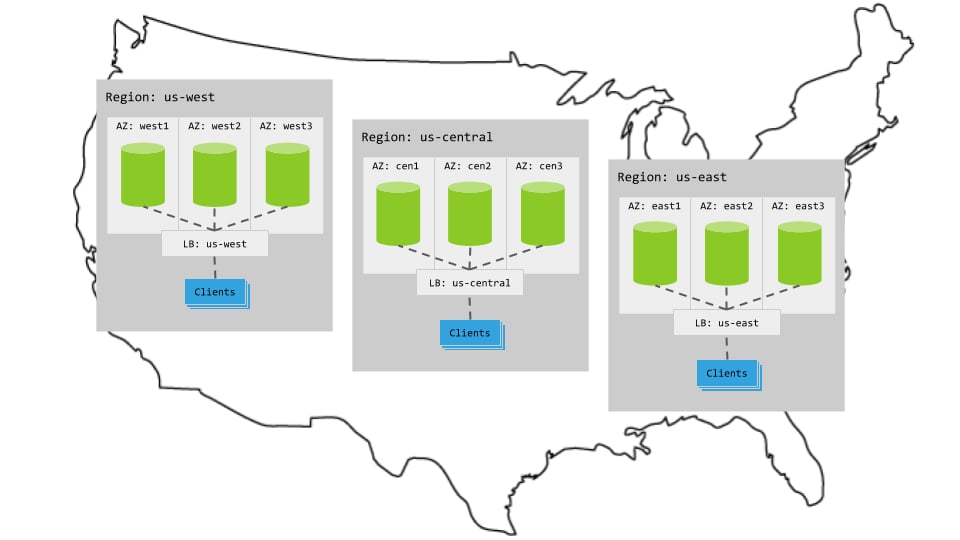
Each multi-region pattern assumes the following setup:
#### Hardware
* 3 regions
* Per region, 3+ AZs with 3+ VMs evenly distributed across them
* Region-specific app instances and load balancers
* Each load balancer redirects to CockroachDB nodes in its region.
* When CockroachDB nodes are unavailable in a region, the load balancer redirects to nodes in other regions.
#### Cluster startup
Start each node with the `--locality` flag specifying its region and AZ combination. For example, the following command starts a node in the `west1` AZ of the `us-west` region:
```shell theme={"theme":{"light":"catppuccin-mocha","dark":"catppuccin-mocha"}}
$ cockroach start \
--locality=region=us-west,zone=west1 \
--certs-dir=certs \
--advertise-addr=table locality to either [`REGIONAL BY TABLE`](#regional-tables) or [`REGIONAL BY ROW`](#regional-by-row-tables).
#### Regional tables
In a *regional* table, access to the table will be fast in the table's home region and slower in other regions. In other words, CockroachDB optimizes access to data in a regional table from a single region. By default, a regional table's home region is the database's primary region, but that can be changed to use any region in the database. Regional tables work well when your application requires low-latency reads and writes for an entire table from a single region.
For instructions showing how to set a table's locality to `REGIONAL BY TABLE` and configure its home region, see `ALTER TABLE ... SET LOCALITY`.
By default, all tables in a multi-region database are *regional* tables that use the database's primary region. Unless you know your application needs different performance characteristics than regional tables provide, there is no need to change this setting.
#### Regional by row tables
In a *regional by row* table, individual rows are optimized for access from different home regions. Each row's home region is specified in a hidden `crdb_region` column, and is by default the region of the gateway node from which the row is inserted. The `REGIONAL BY ROW` setting automatically divides a table and all of its indexes into partitions that use `crdb_region` as the prefix.
Use regional by row tables when your application requires low-latency reads and writes at a row level where individual rows are primarily accessed from a single region. For an example of a table in a multi-region cluster that can benefit from the `REGIONAL BY ROW` setting, see the `users` table from the MovR application, which could store users' data in specific regions for better performance.
To take advantage of regional by row tables:
* Use unique key lookups or queries with `LIMIT` clauses to enable locality optimized searches that prioritize rows in the gateway node's region. If there is a possibility that the results of the query all live in local rows, CockroachDB will first search for rows in the gateway node's region. The search only continues in remote regions if rows in the local region did not satisfy the query.
* Use foreign keys that reference the `crdb_region` column in `REGIONAL BY ROW` tables, unless auto-rehoming is enabled for those tables.
* Turn on auto-rehoming for regional by row tables. A row's home region will be automatically set to the gateway region of any `UPDATE` or `UPSERT` statements that write to those rows.
For instructions showing how to set a table's locality to `REGIONAL BY ROW` and configure the home regions of its rows, see `ALTER TABLE ... SET LOCALITY`.
For more information on regional by row tables, see the [Cockroach Labs blog post](https://www.cockroachlabs.com/blog/regional-by-row/).
Secondary regions are not compatible with databases containing `REGIONAL BY ROW` tables. CockroachDB does not prevent you from defining secondary regions on databases with regional by row tables, but the interaction of these features is not supported.
Therefore, Cockroach Labs recommends that you avoid defining secondary regions on databases that use regional by row table configurations.
### Steps
By default, all tables in a multi-region database are [regional tables](#regional-tables). Therefore, the steps below show how to set up [regional by row tables](#regional-by-row-tables).
1. Create a database and set it as the default database:
```sql theme={"theme":{"light":"catppuccin-mocha","dark":"catppuccin-mocha"}}
CREATE DATABASE test;
```
```sql theme={"theme":{"light":"catppuccin-mocha","dark":"catppuccin-mocha"}}
USE test;
```
[This cluster is already deployed across three regions](#cluster-setup). Therefore, to make this database a "multi-region database", issue the following SQL statement to set the primary region:
```sql theme={"theme":{"light":"catppuccin-mocha","dark":"catppuccin-mocha"}}
ALTER DATABASE test PRIMARY REGION "us-east";
```
Every multi-region database must have a primary region. For more information, see Database regions.
1. Issue the following `ADD REGION` statements to add the remaining regions to the database:
```sql theme={"theme":{"light":"catppuccin-mocha","dark":"catppuccin-mocha"}}
ALTER DATABASE test ADD REGION "us-west";
```
```sql theme={"theme":{"light":"catppuccin-mocha","dark":"catppuccin-mocha"}}
ALTER DATABASE test ADD REGION "us-central";
```
2. Create a `users` table:
```sql theme={"theme":{"light":"catppuccin-mocha","dark":"catppuccin-mocha"}}
CREATE TABLE users (
id UUID PRIMARY KEY DEFAULT gen_random_uuid(),
city STRING NOT NULL,
first_name STRING NOT NULL,
last_name STRING NOT NULL,
address STRING NOT NULL
);
```
By default, all tables in a multi-region cluster default to the [`REGIONAL BY TABLE`](#regional-tables) locality setting. To verify this, issue a `SHOW CREATE` on the `users` table you just created:
```sql theme={"theme":{"light":"catppuccin-mocha","dark":"catppuccin-mocha"}}
SHOW CREATE TABLE users;
```
```
table_name | create_statement
-------------+------------------------------------------------------------------
users | CREATE TABLE public.users (
| id UUID NOT NULL DEFAULT gen_random_uuid(),
| city STRING NOT NULL,
| first_name STRING NOT NULL,
| last_name STRING NOT NULL,
| address STRING NOT NULL,
| CONSTRAINT "primary" PRIMARY KEY (id ASC),
| FAMILY "primary" (id, city, first_name, last_name, address)
| ) LOCALITY REGIONAL BY TABLE IN PRIMARY REGION
```
3. Set the table's locality to [`REGIONAL BY ROW`](#regional-by-row-tables) using the `ALTER TABLE ... SET LOCALITY` statement:
```sql theme={"theme":{"light":"catppuccin-mocha","dark":"catppuccin-mocha"}}
ALTER TABLE users SET LOCALITY REGIONAL BY ROW;
```
```
NOTICE: LOCALITY changes will be finalized asynchronously; further schema changes on this table may be restricted until the job completes
ALTER TABLE SET LOCALITY
```
4. Identify which rows need to be optimized for access from which regions. Issue `UPDATE` statements that modify the automatically created `crdb_region` column. Issue the statements below to associate each row with a home region that depends on its `city` column:
```sql theme={"theme":{"light":"catppuccin-mocha","dark":"catppuccin-mocha"}}
UPDATE users SET crdb_region = 'us-central' WHERE city IN ('chicago', 'milwaukee', 'dallas');
UPDATE users SET crdb_region = 'us-east' WHERE city IN ('washington dc', 'boston', 'new york');
UPDATE users SET crdb_region = 'us-west' WHERE city IN ('los angeles', 'san francisco', 'seattle');
```
By default, the region column will get auto-assigned on insert; this is also known as "auto-homing". For more information about how the `crdb_region` column works, see `ALTER TABLE ... SET LOCALITY REGIONAL BY ROW`.
Note that the SQL engine will avoid sending requests to nodes in other regions when it can instead read a value from a unique column that is stored locally. This capability is known as *locality optimized search*.
A good way to check that your table locality settings are having the expected effect is by monitoring how the performance metrics of a workload change as the settings are applied to a running cluster. For a tutorial showing how table localities can improve performance metrics across a multi-region cluster, see Low Latency Reads and Writes in a Multi-Region Cluster.
## Characteristics
### Latency
For [`REGIONAL BY TABLE` tables](#regional-tables), you get low latency for single-region writes and reads, as well as multi-region stale reads.
For [`REGIONAL BY ROW` tables](#regional-by-row-tables), you get low-latency consistent multi-region reads & writes for rows which are homed in specific regions, and low-latency multi-region stale reads from all other regions.
### Resiliency
Because the `test` database does not specify a survival goal, it uses the default `ZONE` survival goal. With the default settings, an entire availability zone (AZ) can fail without interrupting access to the database.
For more information about how to choose a database survival goal, see When to use `ZONE` vs. `REGION` survival goals.
## Alternatives
* If rows in the table **cannot** be tied to specific geographies, reads must be up-to-date for business reasons or because the table is referenced by foreign keys, and the table is rarely modified, consider the `GLOBAL` Table Locality Pattern.
* If your application can tolerate historical reads in some cases, consider the Follower Reads pattern.
## Tutorial
For a step-by-step demonstration showing how CockroachDB's multi-region capabilities (including [`REGIONAL BY ROW` tables](#regional-by-row-tables)) give you low-latency reads in a distributed cluster, see the tutorial on Low Latency Reads and Writes in a Multi-Region Cluster.
## Demo video
If you'd prefer to watch a video on Regional Tables, check out the following video:
## See also
* Multi-Region Capabilities Overview
* How to Choose a Multi-Region Configuration
* When to Use `ZONE` vs. `REGION` Survival Goals
* When to Use `REGIONAL` vs. `GLOBAL` Tables
* Low Latency Reads and Writes in a Multi-Region Cluster
* Migrate to Multi-Region SQL
* Secondary regions
* `ALTER DATABASE ... SET SECONDARY REGION`
* `ALTER DATABASE ... DROP SECONDARY REGION`
* Topology Patterns Overview
* Single-region patterns
* Development
* Basic Production
* Multi-region patterns
* `REGIONAL` Tables
* `GLOBAL` Tables
* Follower Reads
* Follow-the-Workload
 #### Hardware
* 3 regions
* Per region, 3+ AZs with 3+ VMs evenly distributed across them
* Region-specific app instances and load balancers
* Each load balancer redirects to CockroachDB nodes in its region.
* When CockroachDB nodes are unavailable in a region, the load balancer redirects to nodes in other regions.
#### Cluster startup
Start each node with the
#### Hardware
* 3 regions
* Per region, 3+ AZs with 3+ VMs evenly distributed across them
* Region-specific app instances and load balancers
* Each load balancer redirects to CockroachDB nodes in its region.
* When CockroachDB nodes are unavailable in a region, the load balancer redirects to nodes in other regions.
#### Cluster startup
Start each node with the