> ## Documentation Index
> Fetch the complete documentation index at: https://cockroachlabs.mintlify.site/llms.txt
> Use this file to discover all available pages before exploring further.
# How Does a Changefeed Work?
export const InternalLink = ({version, path = "", children, ...props}) => {
let detectedVersion = version || "stable";
if (typeof window !== 'undefined' && !version) {
const match = window.location.pathname.match(/\/docs\/([^/]+)/);
if (match) {
detectedVersion = match[1];
}
}
const normalizedPath = path.startsWith("/") ? path.slice(1) : path;
return
{children}
;
};
When a changefeed that will emit changes to a sink is started on a node, that node becomes the *coordinator* for the changefeed job (**Node 2** in the diagram). The coordinator node acts as an administrator: keeping track of all other nodes during job execution and the changefeed work as it completes. The changefeed job will run across nodes in the cluster to access changed data in the watched table. The job will evenly distribute changefeed work across the cluster by assigning it to any replica for a particular range, which determines the node that will emit the changefeed data. If a locality filter is specified, work is distributed to a node from those that match the locality filter and has the most locality tiers in common with a node that has a replica.
Each node uses its *aggregator processors* to send back checkpoint progress to the coordinator, which gathers this information to update the *high-water mark timestamp*. The high-water mark acts as a checkpoint for the changefeed’s job progress, and guarantees that all changes before (or at) the timestamp have been emitted. In the unlikely event that the changefeed’s coordinating node were to fail during the job, that role will move to a different node and the changefeed will restart from the last checkpoint. If restarted, the changefeed may re-emit messages starting at the high-water mark time to the current time. Refer to Ordering Guarantees for detail on CockroachDB's at-least-once-delivery-guarantee and how per-key message ordering is applied.
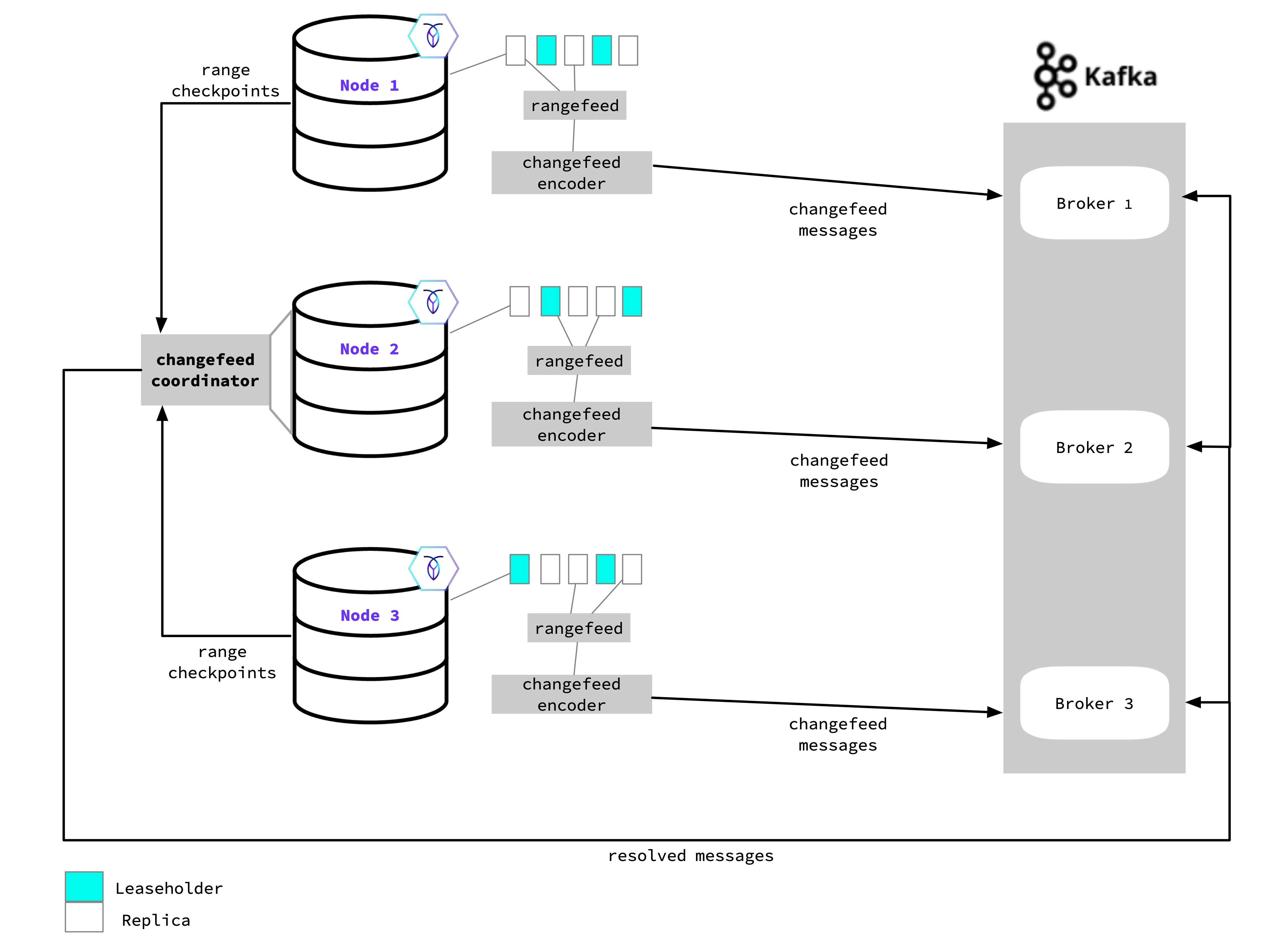 With `resolved` specified when a changefeed is started, the coordinator will send the resolved timestamp (i.e., the high-water mark) to each endpoint in the sink. For example, when using Kafka this will be sent as a message to each partition; for cloud storage, this will be emitted as a resolved timestamp file.
As rows are updated, added, and deleted in the targeted table(s), the node sends the row changes through the rangefeed mechanism to the changefeed encoder, which encodes these changes into the final message format. The message is emitted from the encoder to the sink—it can emit to any endpoint in the sink. In the diagram example, this means that the messages can emit to any Kafka Broker.
If you are running changefeeds from a multi-region cluster, you may want to define which nodes take part in running the changefeed job. You can use the `execution_locality` option with key-value pairs to specify the locality requirements nodes must meet. See Job coordination using the execution locality option for detail on how a changefeed job works with this option.
See the following for more detail on changefeed setup and use:
* Enable rangefeeds
* Changefeed Sinks
* Changefeed Examples
With `resolved` specified when a changefeed is started, the coordinator will send the resolved timestamp (i.e., the high-water mark) to each endpoint in the sink. For example, when using Kafka this will be sent as a message to each partition; for cloud storage, this will be emitted as a resolved timestamp file.
As rows are updated, added, and deleted in the targeted table(s), the node sends the row changes through the rangefeed mechanism to the changefeed encoder, which encodes these changes into the final message format. The message is emitted from the encoder to the sink—it can emit to any endpoint in the sink. In the diagram example, this means that the messages can emit to any Kafka Broker.
If you are running changefeeds from a multi-region cluster, you may want to define which nodes take part in running the changefeed job. You can use the `execution_locality` option with key-value pairs to specify the locality requirements nodes must meet. See Job coordination using the execution locality option for detail on how a changefeed job works with this option.
See the following for more detail on changefeed setup and use:
* Enable rangefeeds
* Changefeed Sinks
* Changefeed Examples