> ## Documentation Index
> Fetch the complete documentation index at: https://cockroachlabs.mintlify.site/llms.txt
> Use this file to discover all available pages before exploring further.
# Schedules Page
export const InternalLink = ({version, path = "", children, ...props}) => {
let detectedVersion = version || "stable";
if (typeof window !== 'undefined' && !version) {
const match = window.location.pathname.match(/\/docs\/([^/]+)/);
if (match) {
detectedVersion = match[1];
}
}
const normalizedPath = path.startsWith("/") ? path.slice(1) : path;
return
{children}
;
};
The **Schedules** page of the DB Console provides details about the scheduled tasks performed by your cluster. These can include:
* Scheduled backups
* Scheduled auto statistics compaction
* Row-level TTL
To view these details, access the DB console and click **Schedules** in the left-hand navigation.
## Filter schedules
* Use the **Status** menu to filter schedules by schedule status, displaying all schedules, only active schedules, or only paused schedules.
* Use the **Show** menu to toggle displaying the latest 50 schedules or all schedules on the cluster.
## Schedules list
Use the **Schedules** list to see your active and paused schedules.
* To view schedule details click the schedule ID.
* If you drop a schedule, it will no longer be listed.
The following screenshot shows a list of backups and automated statistics compaction schedules:
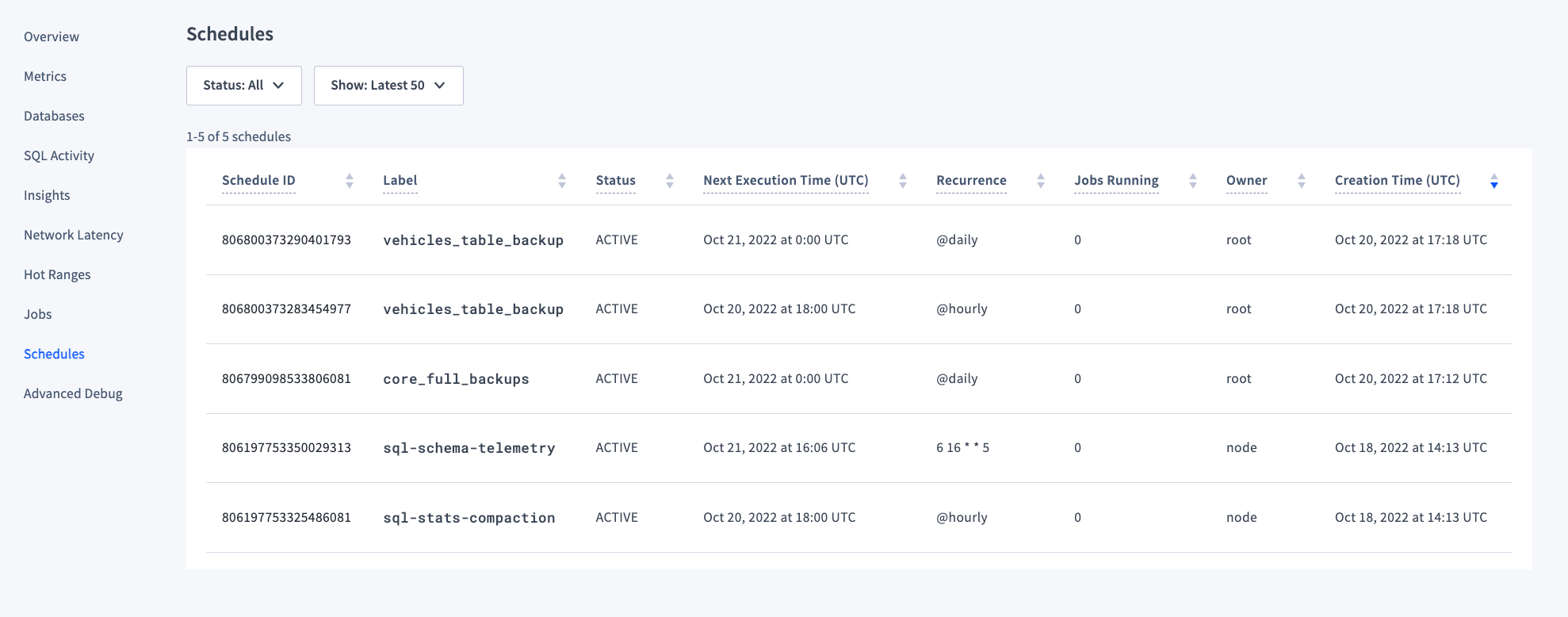 | Column | Description |
| ------------------------- | ---------------------------------------------------------------------------------------------------------------------------------------------------------------------------------------------------------------------------------------------- |
| Schedule ID | The unique ID for the schedule. This is used to pause, resume, and drop schedules. |
| Label | The label given to the schedule on creation. |
| Status | The current status of the schedule, **Active** or **Paused**. |
| Next Execution Time (UTC) | The next time at which the scheduled task will run. |
| Recurrence | How often the schedule will run. |
| Jobs Running | The number of jobs currently running for that schedule. |
| Owner | The user that created the schedule. |
| Creation Time (UTC) | The time at which the user originally created the schedule. |
## Schedule details
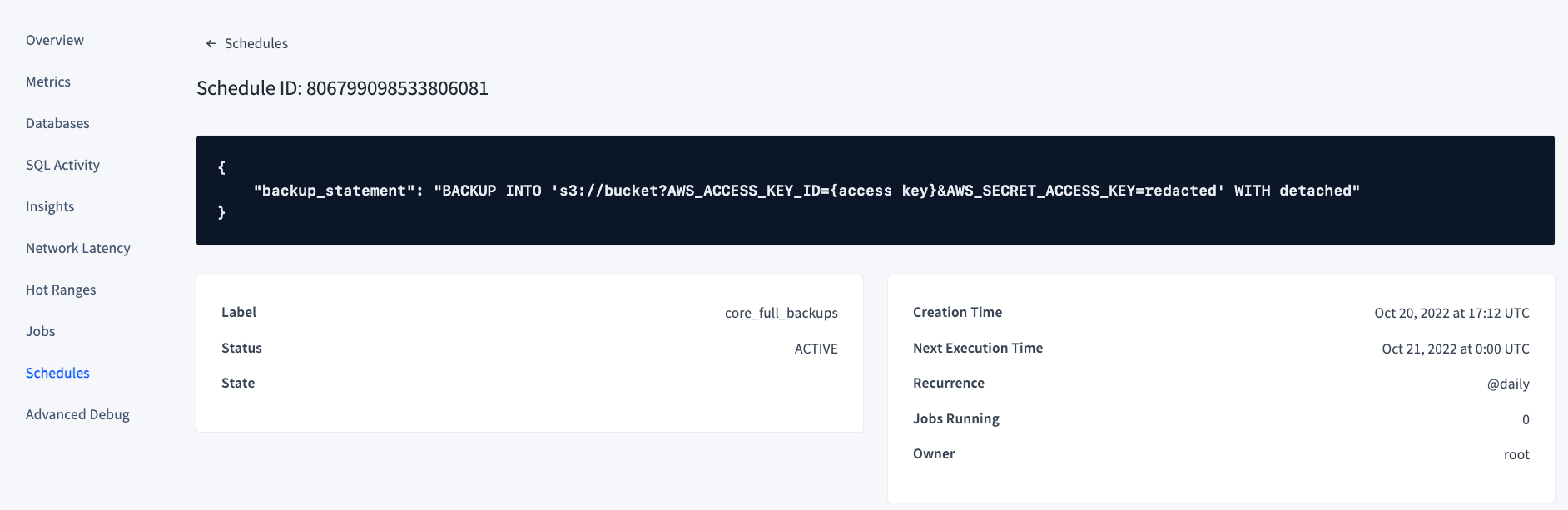
Click on a schedule ID to view the full SQL statement that the schedule runs. For example, the following screenshot shows the resulting `BACKUP` statement for a full cluster backup recurring every day:
| Column | Description |
| ------------------------- | ---------------------------------------------------------------------------------------------------------------------------------------------------------------------------------------------------------------------------------------------- |
| Schedule ID | The unique ID for the schedule. This is used to pause, resume, and drop schedules. |
| Label | The label given to the schedule on creation. |
| Status | The current status of the schedule, **Active** or **Paused**. |
| Next Execution Time (UTC) | The next time at which the scheduled task will run. |
| Recurrence | How often the schedule will run. |
| Jobs Running | The number of jobs currently running for that schedule. |
| Owner | The user that created the schedule. |
| Creation Time (UTC) | The time at which the user originally created the schedule. |
## Schedule details
Click on a schedule ID to view the full SQL statement that the schedule runs. For example, the following screenshot shows the resulting `BACKUP` statement for a full cluster backup recurring every day:
 You may also view a `protected_timestamp_record` on this page. This indicates that the schedule is actively managing its own protected timestamp records independently of GC TTL. See Protected timestamps and scheduled backups for more detail.
## See also
* `CREATE SCHEDULE FOR BACKUP`
* Take Full and Incremental Backups
You may also view a `protected_timestamp_record` on this page. This indicates that the schedule is actively managing its own protected timestamp records independently of GC TTL. See Protected timestamps and scheduled backups for more detail.
## See also
* `CREATE SCHEDULE FOR BACKUP`
* Take Full and Incremental Backups