

Prerequisites
Supported databases
The following source databases are supported:- PostgreSQL 11-16
- MySQL 5.7-8.4
- Oracle Database 19c (Enterprise Edition) and 21c (Express Edition)
Database configuration
Ensure that the source and target schemas are identical, unless you enable automatic schema creation with the option. If you are creating the target schema manually, review the behaviors in .MOLT Fetch does not support migrating sequences. If your source database contains sequences, refer to the . If a sequential key is necessary in your CockroachDB table, you must create it manually. After using MOLT Fetch to load the data onto the target, but before cutover, make sure to update each sequence’s current value using so that new inserts continue from the correct point.
User permissions
The SQL user running MOLT Fetch requires specific privileges on both the source and target databases:Target cluster session variable
Ensure that thestatement_timeout is set to 0s for the CockroachDB user on the target cluster:
How it works
MOLT Fetch operates in two distinct phases to move data from the source databases to CockroachDB. The data export phase moves data to intermediate storage (either cloud storage or a local file server). The data import phase moves data from that intermediate storage to the CockroachDB cluster. For details on available modes, refer to Define fetch mode.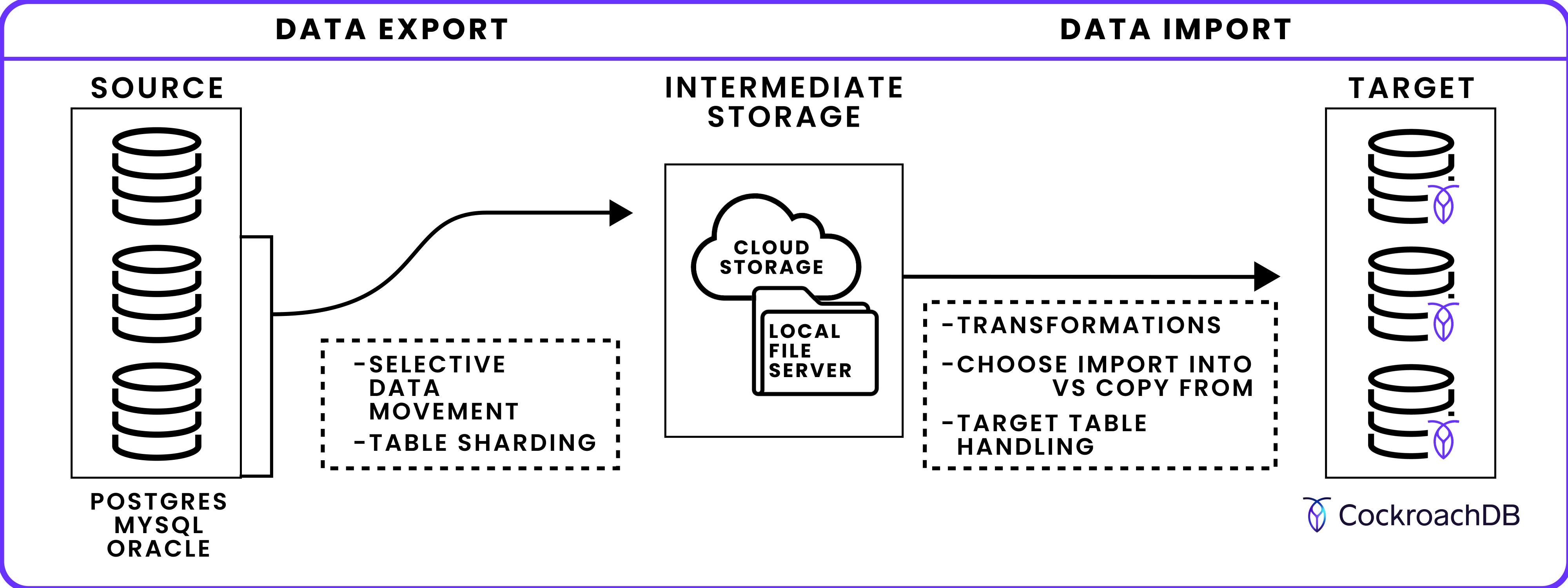
Data export phase
In this first phase, MOLT Fetch connects to the source database and exports table data to intermediate storage.- Selective data movement: By default, MOLT Fetch moves all data from the —source database to CockroachDB. If instead you want to move a subset of the available data, use the , , and flags.
- Table sharding for concurrent export: Multiple tables and table shards can be exported simultaneously using and , with large tables divided into shards for parallel processing.
- Load into intermediate storage: Define whether data is written to cloud storage (Amazon S3, Google Cloud Storage, Azure Blob Storage), a local file server, or directly to CockroachDB memory. Intermediate storage enables continuation after a MOLT Fetch failure by storing continuation tokens.
Data import phase
MOLT Fetch loads the exported data from intermediate storage to the target CockroachDB database.-
IMPORT INTOvs.COPY FROM: This phase uses (faster, tables offline during import) or (slower, tables remain queryable) to move data. - Target table handling: Target tables can be automatically created, truncated, or left unchanged based on settings.
- Schema/table transformations: Use JSON to map computed columns from source to target, map partitioned tables to a single target table, rename tables on the target database, or rename database schemas.
molt fetch command.
Run MOLT Fetch
The following section describes how to use the command and how to set its main .Specify source and target databases
specifies the connection string of the source database. PostgreSQL or CockroachDB connection string:-
For Oracle Multitenant databases, specifies the container database (CDB) connection. specifies the pluggable database (PDB):
- If the Oracle database requires TLS-encrypted connections, connect via a TNS alias and specify the wallet directory with . Refer to .
Define fetch mode
specifies the MOLT Fetch behavior.data-load (default) instructs MOLT Fetch to load the source data into CockroachDB:
export-only instructs MOLT Fetch to export the source data to the specified cloud storage or local file server. It does not load the data into CockroachDB:
import-only instructs MOLT Fetch to load the source data in the specified cloud storage or local file server into the CockroachDB target:
Select data to migrate
By default, MOLT Fetch moves all data from the database to CockroachDB. Use the following flags to move a subset of data.Schema and table selection
specifies a range of schema objects to move to CockroachDB, formatted as a POSIX regex string. For example, to move every table in the source database’smigration_schema schema:
does not apply to MySQL sources because MySQL tables belong directly to the database specified in the connection string, not to a separate schema.
Row-level filtering
Use to specify the path to a JSON file that defines row-level filtering for data load. This enables you to move a subset of data in a table, rather than all data in the table. To apply row-level filters during replication, use with .filters, each with a resource_specifier (schema and table) and a SQL expression expr. For example, the following example exports only rows from migration_schema.t1 where v > 100:
expr is case-sensitive and must be valid in your source dialect. For example, when using Oracle as the source, quote all identifiers and escape embedded quotes:
If the expression references columns that are not indexed, MOLT Fetch will emit a warning like:
filter expression 'v > 100' contains column 'v' which is not indexed. This may lead to performance issues.Shard tables for concurrent export
During the data export phase, MOLT Fetch can divide large tables into multiple shards for concurrent export. To control the number of tables exported at a time, use the flag. This flag controls table-level parallelism. MOLT Fetch does not prioritize tables by size, row count, or other criteria and processes tables in a randomized order for each run. To control the number of shards created per table, use the flag. This flag controls shard-level parallelism. MOLT Fetch does not prioritize shards by size. For example:- Range-based sharding (default for non-PostgreSQL sources): Tables are divided based on numerical ranges found in primary key values. Only tables with , , or primary keys can use range-based sharding. Tables with other primary key data types export as a single shard, which can make the copy slow when the primary key is text or spans several columns.
-
Stats-based sharding (PostgreSQL only; default for PostgreSQL 11+ sources): Tables are divided by analyzing the
pg_statsview to create more evenly distributed shards, up to a maximum of 200 shards. Primary keys of any data type are supported. Stats-based sharding is enabled by default for PostgreSQL 11+ sources; to restore range-based sharding, pass .
SELECT permissions on source tables and on each table’s pg_stats view. The latter permission is automatically granted to users that can read the table.
To optimize stats-based sharding, run ANALYZE on source tables before migration to ensure that table statistics are up-to-date and shards are evenly distributed. This requires MAINTAIN or OWNER permissions on the table. You can analyze specific primary key columns or the entire table. For example:
ANALYZE can run in the background. You can run ANALYZE with MAINTAIN or OWNER privileges during migration preparation, then perform the actual migration with standard SELECT privileges.
Migration without running
ANALYZE will still work, but shard distribution may be less even.ANALYZE on the source tables first):
--use-stats-based-sharding=false to the same command.
When stats-based sharding is enabled, monitor the log output for each table you want to migrate.
If stats-based sharding is successful on a table, MOLT logs the following INFO message:
WARNING message and defaults to range-based sharding:
WARNING and continues with the migration:
Define intermediate storage
MOLT Fetch can move the source data to CockroachDB via cloud storage, a local file server, or directly without an intermediate store.Bucket path
instructs MOLT Fetch to write intermediate files to a path within Google Cloud Storage, Amazon S3, or Azure Blob Storage to which you have the necessary permissions. Use additional , shown in the following examples, to specify authentication or region parameters as required for bucket access. Connect to a Google Cloud Storage bucket with and :ap_south-1 region:
When is set,
IMPORT INTO must be used for data movement.Local path
instructs MOLT Fetch to write intermediate files to a path within a . specifies the address of the local file server. For example:molt fetch, then CockroachDB cannot reach an address such as localhost:3000. In these situations, use to specify an address for the local file server that is publicly accessible. For example:
Direct copy
specifies that MOLT Fetch should useCOPY FROM to move the source data directly to CockroachDB without an intermediate store:
- Direct copy does not support compression or continuation.
- The
--use-copyflag is redundant with .
IMPORT INTO vs. COPY FROM
MOLT Fetch can use either or to load data into CockroachDB.
By default, MOLT Fetch uses IMPORT INTO:
IMPORT INTOachieves the highest throughput, but to achieve its import speed. Tables are taken back online once an completes successfully. See .IMPORT INTOsupports compression using the flag, which reduces the amount of storage used.
COPY FROM:
COPY FROMenables your tables to remain online and accessible. However, it is slower than using .COPY FROMdoes not support compression.
COPY FROM is also used for direct copy.Handle target tables
defines how MOLT Fetch loads data on the CockroachDB tables that match the selection. To load the data without changing the existing data in the tables, usenone:
truncate-if-exists:
drop-on-target-and-recreate:
drop-on-target-and-recreate option, MOLT Fetch creates a new CockroachDB table to load the source data if one does not already exist. To guide the automatic schema creation, you can explicitly map source types to CockroachDB types. drop-on-target-and-recreate does not create indexes or constraints other than and .
Mismatch handling
If eithernone or truncate-if-exists is set, molt fetch loads data into the existing tables on the target CockroachDB database. If the target schema mismatches the source schema, molt fetch will exit early in certain cases, and will need to be re-run from the beginning. For details, refer to .
This does not apply when
drop-on-target-and-recreate is specified, since this option automatically creates a compatible CockroachDB schema.Skip primary key matching
removes the for data load. When this flag is set:- The data load proceeds even if the source or target table lacks a primary key, or if their primary key columns do not match.
- Table sharding is disabled. Each table is exported in a single batch within one shard, bypassing and . As a result, memory usage and execution time may increase due to full table scans.
- If the source table contains duplicate rows but the target has or constraints, duplicate rows are deduplicated during import.
Type mapping
Ifdrop-on-target-and-recreate is set, MOLT Fetch automatically creates a CockroachDB schema that is compatible with the source data. The column types are determined as follows:
- PostgreSQL types are mapped to existing CockroachDB that have the same .
-
The following MySQL types are mapped to corresponding CockroachDB types:
-
The following Oracle types are mapped to CockroachDB types:
-
To override the default mappings for automatic schema creation, you can map source to target CockroachDB types explicitly. These are defined in the JSON file indicated by the flag. The allowable custom mappings are valid CockroachDB aliases, casts, and the following mappings specific to MOLT Fetch and :
- <>
- <>
- <>
- <>
- <>
- <>
- <>
tablespecifies the table that will use the custom type mappings incolumn_type_map. The value is written as{schema}.{table}.columnspecifies the column that will use the custom type mapping. If*is specified, then all columns in thetablewith the matchingsource_typeare converted.source_typespecifies the source type to be mapped.crdb_typespecifies the target CockroachDB to be mapped.
Define transformations
You can define transformation rules to be performed on the target database during the fetch task. These can be used to:- Map from source to target.
- Map partitioned tables to a single target table.
- Rename tables on the target database.
- Rename database schemas.
Transformation rules example
The following JSON example defines three transformation rules: rule1 maps computed columns, rule 2 renames tables, and rule 3 renames schemas.
Column exclusions and computed columns
resource_specifier: Identifies which schemas and tables to transform.schema: POSIX regex matching source schemas.table: POSIX regex matching source tables.
column_exclusion_opts: Exclude columns or map them as computed columns.column: POSIX regex matching source columns to exclude.add_computed_def: Whentrue, map matching columns as on target tables using and the source column definition. All matching columns must be computed columns on the source.Columns matchingcolumnare not moved to CockroachDB ifadd_computed_defisfalse(default) or if matching columns are not computed columns.
1 maps all source age columns to on CockroachDB. This assumes that all matching age columns are defined as computed columns on the source:
Table renaming
resource_specifier: Identifies which schemas and tables to transform.schema: POSIX regex matching source schemas.table: POSIX regex matching source tables.
table_rename_opts: Rename tables on the target.-
value: Target table name. For a single matching source table, renames it to this value. For multiple matches (n-to-1), consolidates matching partitioned tables with the same table definition into a single table with this name. For n-to-1 mappings:- Use
--use-copyor--direct-copyfor data movement. - Manually create the target table. Do not use
--table-handling drop-on-target-and-recreate.
- Use
-
2 maps all table names with prefix charges_part to a single charges table on CockroachDB (an n-to-1 mapping). This assumes that all matching charges_part.* tables have the same table definition:
Schema renaming
resource_specifier: Identifies which schemas and tables to transform.schema: POSIX regex matching source schemas.table: POSIX regex matching source tables.
schema_rename_opts: Rename database schemas on the target.value: Target schema name. For example,previous_schema.table1becomesnew_schema.table1.
3 renames the database schema previous_schema to new_schema on CockroachDB:
General notes
Each rule is applied in the order it is defined. If two rules overlap, the later rule will override the earlier rule. To verify that the logging shows that the computed columns are being created: When runningmolt fetch, set debug and look for ALTER TABLE ... ADD COLUMN statements with the STORED or VIRTUAL keywords in the log output:
molt fetch, issue a SHOW CREATE TABLE statement on CockroachDB:
Continue MOLT Fetch after interruption
If MOLT Fetch fails while loading data into CockroachDB from intermediate files, it exits with an error message, fetch ID, and continuation token for each table that failed to load on the target database. You can use this information to continue the task from the continuation point where it was interrupted. Continuation is only possible under the following conditions:- All data has been exported from the source database into intermediate files on cloud or local storage.
- The initial load of source data into the target CockroachDB database is incomplete.
Only one fetch ID and set of continuation tokens, each token corresponding to a table, are active at any time. See List active continuation tokens.
molt fetch command and include the .
molt fetch output for each failed table. If the fetch task encounters a subsequent error, it generates a new token for each failed table. See List active continuation tokens.
This will retry only the table that corresponds to the continuation token. If the fetch task succeeds, there may still be source data that is not yet loaded into CockroachDB.
part_ and have the .csv.gz or .csv extension, depending on compression type (gzip by default). For example:
Continuation is not possible when using direct copy.
List active continuation tokens
To view all active continuation tokens, issue amolt fetch tokens list command along with , which specifies the for the target CockroachDB database. For example:
Enable replication
A change data capture (CDC) cursor is written to the MOLT Fetch output ascdc_cursor at the beginning and end of the fetch task.
For MySQL:
cdc_cursor value is also included in the output of a fetch task from a PostgreSQL source. However, in the case of a PostgreSQL source, you can instead enable replication with the and flags, which must be defined.
Use the cdc_cursor value as the checkpoint for MySQL or Oracle replication with MOLT Replicator. Use the value as the checkpoint for PostgreSQL replication with MOLT Replicator. Refer to in the MOLT Replicator documentation.
You can also use the cdc_cursor value with an external change data capture (CDC) tool to continuously replicate subsequent changes from the source database to CockroachDB.
Docker usage
Authentication
When using MOLT Fetch with cloud storage, it is necessary to specify volumes and environment variables, as described in the following sections for Google Cloud Storage and Amazon S3. No additional configuration is needed when running MOLT Fetch with a local file server or in direct copy mode:docker run, see the Docker documentation.
Google Cloud Storage
If you are using Google Cloud Storage for cloud storage: Volume map theapplication_default_credentials.json file into the container, and set the GOOGLE_APPLICATION_CREDENTIALS environment variable to point to this file.
GOOGLE_APPLICATION_CREDENTIALS environment variable, set CLOUDSDK_CONFIG to point to the configuration directory:
Amazon S3
If you are using Amazon S3 for cloud storage: Volume map the host’s~/.aws directory to the /root/.aws directory inside the container, and set the required AWS_REGION, AWS_SECRET_ACCESS_KEY, and AWS_ACCESS_KEY_ID environment variables:
Local connection strings
When testing locally, specify the host as follows:-
For macOS, use
host.docker.internal. For example: -
For Linux and Windows, use
172.17.0.1. For example:
Common uses
Bulk data load
When migrating data to CockroachDB in a bulk load (without utilizing to minimize system downtime), run themolt fetch command with the required flags, as shown below:
Specify the source and target database connections. For connection string formats, refer to Source and target databases.
- PostgreSQL
- MySQL
- Oracle
none, which loads data without changing existing data in the tables. For details, refer to Target table handling:
pg_current_wal_insert_lsn() on PostgreSQL, gtid_executed on MySQL, and CURRENT_SCN on Oracle). This is appropriate when:
- Performing a one-time data migration with no plan to replicate ongoing changes.
- Exporting data from a read replica where replication checkpoints are unavailable.
molt fetch command should include the source, target, data path, and flags:
molt fetch in this way, refer to these common migration approaches:
Initial bulk load (before replication)
In a migration that utilizes , perform an initial data load before . Run themolt fetch command without , as shown below:
The workflow is the same as Bulk data load, except:
- Exclude . MOLT Fetch will query and record replication checkpoints.
- After the data load completes, check the CDC cursor in the output for the checkpoint value to use with MOLT Replicator.
- PostgreSQL
- MySQL
- Oracle
- You must include and to automatically create the publication and replication slot during the data load.
molt fetch command should include the source, target, and data path flags:cdc_cursor value at the end of the fetch task:molt fetch in this way, refer to these common migration approaches:
Known limitations
- Only tables with types of , , or can be sharded with .
GEOMETRYandGEOGRAPHYtypes are not supported.
OID LOBtypes in PostgreSQL are not supported, although similar types likeBYTEAare supported.
- Migrations must be performed from a single Oracle schema. You must include so that MOLT Fetch only loads data from the specified schema. Refer to .
- Specifying is also strongly recommended to ensure that only necessary tables are migrated from the Oracle schema.
- Oracle advises against
LONG RAWcolumns and recommends converting them toBLOB.LONG RAWcan only store binary values up to 2GB, and only oneLONG RAWcolumn per table is supported.