

- Read latency must be low, but write latency can be much higher.
- Reads must be up-to-date for business reasons or because the table is referenced by .
- Rows in the table, and all latency-sensitive reads, cannot be tied to specific regions.
GLOBAL locality can survive zone or region failures, depending on the database-level setting.
For new clusters using the , Cockroach Labs recommends lowering the setting to 250ms. This setting is especially helpful for lowering the write latency of . Nodes can run with different values for --max-offset, but only for the purpose of updating the setting across the cluster using a rolling upgrade.
Before you begin
Fundamentals
Multi-region patterns require thinking about the following questions:- What are your ? Do you need to survive a ? Do you need to survive a ?
- What are the that will provide the performance characteristics you need for each table’s data?
- Do you need low-latency reads and writes from a single region? Do you need that single region to be configurable at the ? Or will suffice?
- Do you have a “read-mostly” , but that must be read with low latency from all regions?
- The concept of , which CockroachDB uses to place and balance data based on how you define survival goal and table locality settings.
- The recommendations in our , including our . Afterwards, perform a proof of concept to size hardware for your use case.
Cluster setup
Each assumes the following setup: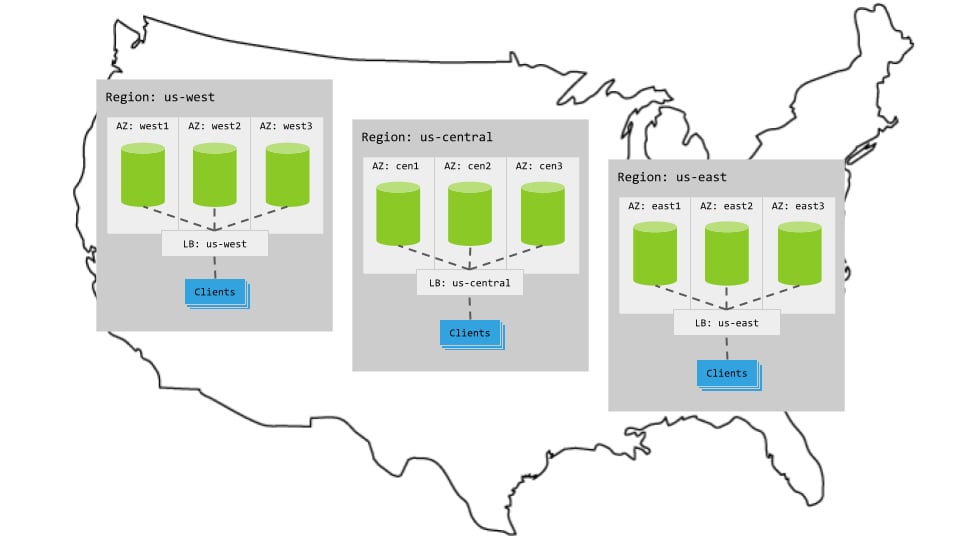
Hardware
- 3 regions
- Per region, 3+ AZs with 3+ VMs evenly distributed across them
- Region-specific app instances and load balancers
- Each load balancer redirects to CockroachDB nodes in its region.
- When CockroachDB nodes are unavailable in a region, the load balancer redirects to nodes in other regions.
Cluster startup
Start each node with the flag specifying its region and AZ combination. For example, the following command starts a node in thewest1 AZ of the us-west region:
Configuration
Summary
To use this pattern, set the toGLOBAL.
A global table is optimized for low-latency reads from every region in the database. This means that any region can effectively act as the home region of the table. The tradeoff is that writes will incur higher latencies from any given region, since writes have to be replicated across every region to make the global low-latency reads possible. Use global tables when your application has a “read-mostly” table of reference data that is rarely updated, and needs to be available to all regions.
For an example of a table that can benefit from the global table locality setting in a multi-region deployment, see the promo_codes table from the .
For instructions showing how to set a table’s locality to GLOBAL, see .
For more information about global tables, including troubleshooting information, see .
Steps
-
Create a database and set it as the default database:
This cluster is already deployed across three regions. Therefore, to make this database a “multi-region database”, issue the following SQL statement to :
Every multi-region database must have a primary region. For more information, see .
-
Issue the following statements to add the remaining regions to the database:
-
Create a by issuing the following statement:
Alternatively, you can set an existing table’s locality to
GLOBALusing :
Characteristics
Latency
Global tables support low-latency, global reads of read-mostly data using an extension to CockroachDB’s standard transaction protocol called .Reads
Thanks to the protocol extension, reads againstGLOBAL tables access a consistent local replica and therefore never leave the region. This keeps read latency low.
Writes
Writes incur higher latencies than reads, since they require a “commit-wait” step to ensure consistency. For more information about how this works, see .Resiliency
Because thetest database does not specify a , it uses the default . With the default settings, an entire zone can fail without interrupting access to the database.
For more information about how to choose a database survival goal, see .
Troubleshooting
High follower read latency on global tables
Reads on multi-region global tables can experience sporadic high latency on if the round trip time between cluster nodes is higher than 150ms. To work around this issue, consider setting thekv.closed_timestamp.lead_for_global_reads_override to a value greater than 800ms.
The value of kv.closed_timestamp.lead_for_global_reads_override will impact write latency to global tables, so you should proceed in 100ms increments until the high read latency no longer occurs. If you’ve increased the setting to 1500ms and the problem persists, you should .
Alternatives
- If rows in the table, and all latency-sensitive queries, can be tied to specific geographies, consider the pattern.
Tutorial
For a step-by-step demonstration showing how CockroachDB’s multi-region capabilities (includingGLOBAL and REGIONAL tables) give you low-latency reads in a distributed cluster, see the tutorial on .
See also
-
- Single-region patterns
- Multi-region patterns
- Single-region patterns