

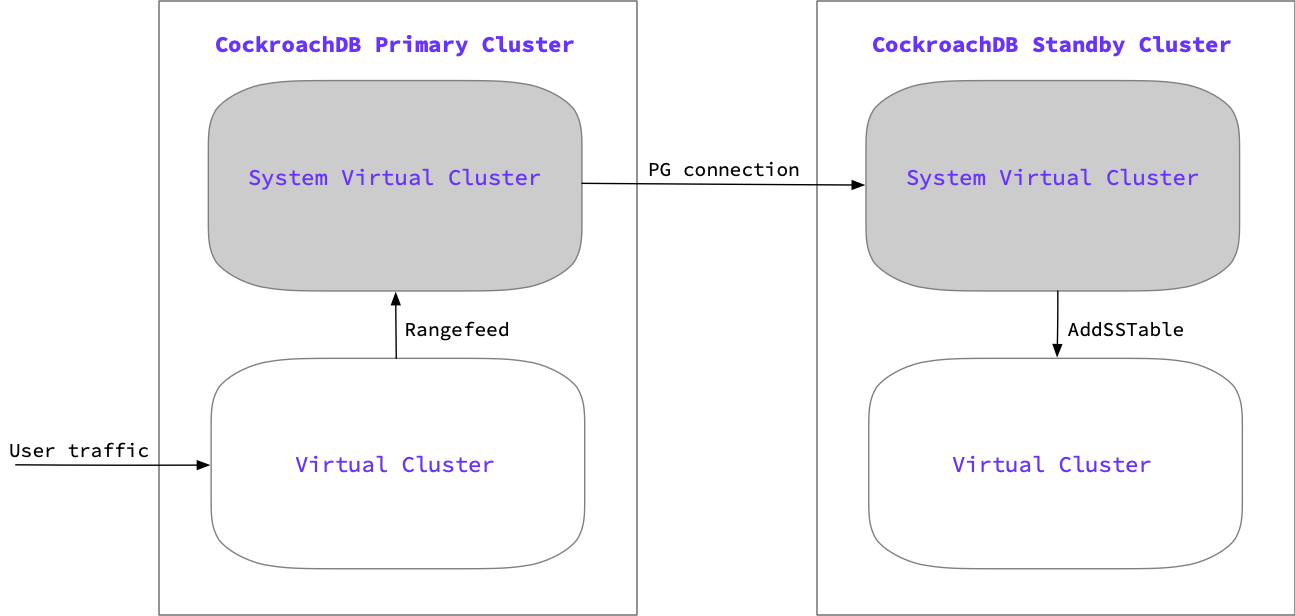
- The system virtual cluster manages the cluster’s control plane and the replication of the cluster’s data. Admins connect to the system virtual cluster to configure and manage the underlying CockroachDB cluster, set up PCR, create and manage a virtual cluster, and observe metrics and logs for the CockroachDB cluster and each virtual cluster.
- Each other virtual cluster manages its own data plane. Users connect to a virtual cluster by default, rather than the system virtual cluster. To connect to the system virtual cluster, the connection string must be modified. Virtual clusters contain user data and run application workloads. When PCR is enabled, the non-system virtual cluster on both primary and secondary clusters is named
main.
PCR stream start-up sequence
stream consists of two jobs: one each on the standby and primary cluster:- Standby consumer job: Communicates with the primary cluster via an ordinary SQL connection and is responsible for initiating the replication stream. The consumer job ingests updates from the primary cluster producer job.
- Primary producer job: Protects data on the primary cluster and sends updates to the standby cluster.
- The standby’s consumer job connects via its system virtual cluster to the primary cluster and starts the primary cluster’s physical stream producer job.
- The primary cluster chooses a timestamp at which to start the physical replication stream. Data on the primary is protected from until it is replicated to the standby using a .
- The primary cluster returns the timestamp and a for the replication job.
- The standby cluster retrieves a list of all nodes in the primary cluster. It uses this list to distribute work across all nodes in the standby cluster.
- The initial scan runs on the primary and backfills all data from the primary virtual cluster as of the starting timestamp of the replication stream.
- Once the initial scan is complete, the primary then begins streaming all changes from the point of the starting timestamp.
Start-up sequence with read on standby
This feature is in and subject to change. To share feedback and/or issues, contact Support.
READ VIRTUAL CLUSTER option, which allows you to perform reads on the standby’s replicating virtual cluster. When this option is specified, the following additional steps occur during the PCR stream start-up sequence:
- The system virtual cluster on the standby also creates a
readonlyvirtual cluster alongside the replicating virtual cluster. Thereadonlyvirtual cluster will be offline initially. - After the initial scan of the primary completes, the standby’s replicating virtual cluster has a complete snapshot of the latest data on the primary. The PCR job will then start the
readonlyvirtual cluster. - When the startup completes, the
readonlyvirtual cluster will be available to serve read queries. The queries will read from historical data on the replicating virtual cluster. The historical time is determined by the of the PCR job (the latest time at which the standby cluster has consistent data). Thereplicated_timewill move forward as the PCR job continues to run.
During the PCR stream
The replication happens at the byte level, which means that the job is unaware of databases, tables, row boundaries, and so on. However, when a failover to the standby cluster is initiated, the replication job ensures that the cluster is in a transactionally consistent state as of a certain point in time. Beyond the application data, the job will also replicate users, privileges, basic zone configuration, and schema changes. During the job, are periodically emitting resolved timestamps, which is the time where the ingested data is known to be consistent. Resolved timestamps provide a guarantee that there are no new writes from before that timestamp. This allows the standby cluster to move the forward as the replicated timestamp advances. This information is sent to the primary cluster, which allows for to continue as the replication stream on the standby cluster advances.If the primary cluster does not receive replicated time information from the standby after 24 hours, it cancels the replication job. This ensures that an inactive replication job will not prevent garbage collection.
Failover and promotion process
The tracked replicated time and the advancing protected timestamp allows the replication stream to also track retained time, which is a timestamp in the past indicating the lower bound that the replication stream could fail over to. Therefore, the failover window for a replication job falls between the retained time and the replicated time.
When a PCR stream is started with a
readonly virtual cluster, the job will delete the readonly virtual cluster automatically if a failover is initiated with a . If the failover is initiated with the , the readonly virtual cluster will remain on the standby cluster.