

- Read and write latency must be low.
- Rows in the table, and all latency-sensitive queries, can be tied to specific regions.
250ms. This
setting is especially helpful for lowering the write latency of . Nodes can run with different values for --max-offset, but only
for the purpose of updating the setting across the cluster using a rolling upgrade.
Before you begin
Fundamentals
Multi-region patterns require thinking about the following questions:- What are your ? Do you need to survive a ? Do you need to survive a ?
- What are the that will provide the performance characteristics you need for each table’s data?
- Do you need low-latency reads and writes from a single region? Do you need that single region to be configurable at the ? Or will suffice?
- Do you have a “read-mostly” , but that must be read with low latency from all regions?
- The concept of , which CockroachDB uses to place and balance data based on how you define survival goal and table locality settings.
- The recommendations in our , including our . Afterwards, perform a proof of concept to size hardware for your use case.
Cluster setup
Each assumes the following setup: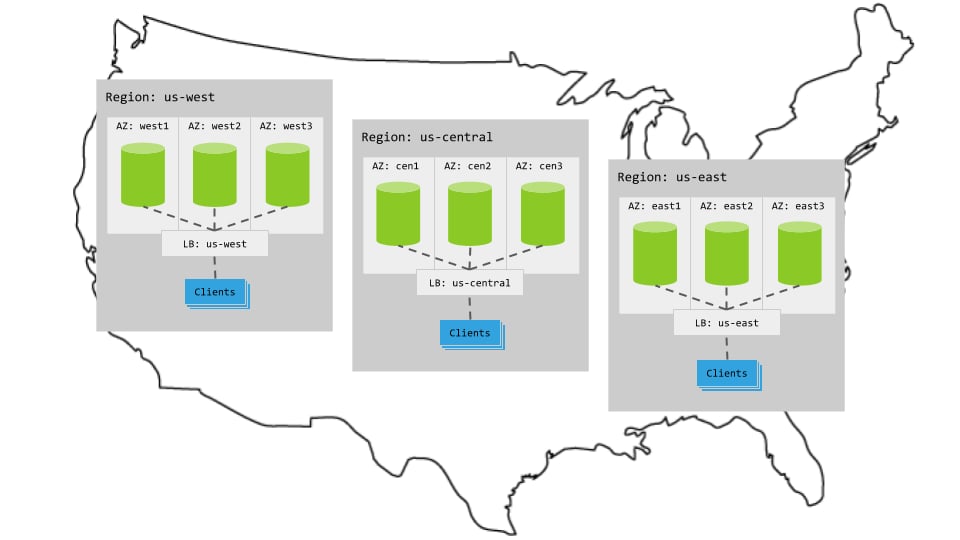
Hardware
- 3 regions
- Per region, 3+ AZs with 3+ VMs evenly distributed across them
- Region-specific app instances and load balancers
- Each load balancer redirects to CockroachDB nodes in its region.
- When CockroachDB nodes are unavailable in a region, the load balancer redirects to nodes in other regions.
Cluster startup
Start each node with the flag specifying its region and AZ combination. For example, the following command starts a node in thewest1 AZ of the us-west region:
Configuration
Summary
To use this pattern, set the to eitherREGIONAL BY TABLE or REGIONAL BY ROW.
Regional tables
In a regional table, access to the table will be fast in the table’s home region and slower in other regions. In other words, CockroachDB optimizes access to data in a regional table from a single region. By default, a regional table’s home region is the , but that can be changed to use any region in the database. Regional tables work well when your application requires low-latency reads and writes for an entire table from a single region. For instructions showing how to set a table’s locality toREGIONAL BY TABLE and configure its home region, see .
By default, all tables in a multi-region database are regional tables that use the database’s primary region. Unless you know your application needs different performance characteristics than regional tables provide, there is no need to change this setting.
Regional by row tables
In a regional by row table, each row is optimized for access from a specific home region. Each row’s home region is specified in a hidden , which defaults to the region of the that inserted the row. TheREGIONAL BY ROW setting automatically the table and all of by region using crdb_region as the partition key prefix.
Use regional by row tables when individual rows are frequently accessed from a single region, and your application requires low-latency reads and writes at the row level. A typical REGIONAL BY ROW use case is the users table in the , where user data can be co-located with the user’s region for better performance.
To take advantage of regional by row tables:
- Use unique key lookups or queries with clauses to enable that prioritize rows in the gateway node’s region. If there is a possibility that the results of the query all live in local rows, CockroachDB will first search for rows in the gateway node’s region. The search only continues in remote regions if rows in the local region did not satisfy the query.
- Use that reference the in tables, unless for those tables.
- . A row’s home region will be automatically set to the gateway region of any or statements that write to those rows.
REGIONAL BY ROW and configure the home regions of its rows, refer to .
For more information on regional by row tables, see the Cockroach Labs blog post.
are not compatible with databases containing
tables. CockroachDB does not prevent you from
defining secondary regions on databases with regional by row tables, but the interaction of these features is not
supported. Therefore, Cockroach Labs recommends that you avoid defining secondary regions on databases that use
regional by row table configurations.
Steps
By default, all tables in a multi-region database are regional tables. Therefore, the steps below
show how to set up regional by row tables.
-
Create a database and set it as the default database:
This cluster is already deployed across three regions. Therefore, to make this database a “multi-region database”, issue the following SQL statement to :
Every multi-region database must have a primary region. For more information, see .
-
Issue the following statements to add the remaining regions to the database:
-
Create a
userstable:By default, all tables in a multi-region cluster default to theREGIONAL BY TABLElocality setting. To verify this, issue a on theuserstable you just created: -
Set the table’s locality to
REGIONAL BY ROWusing the statement: -
Identify which rows need to be optimized for access from which regions. Issue statements that modify the automatically created column. Issue the statements below to associate each row with a home region that depends on its
citycolumn:By default, the region column will get auto-assigned on insert; this is also known as “auto-homing”. For more information about how thecrdb_regioncolumn works, see .
Characteristics
Latency
ForREGIONAL BY TABLE tables, you get low latency for single-region writes and reads, as well as multi-region stale reads.
For REGIONAL BY ROW tables, you get low-latency consistent multi-region reads & writes for rows which are homed in specific regions, and low-latency multi-region stale reads from all other regions.
Resiliency
Because thetest database does not specify a , it uses the default . With the default settings, an entire availability zone (AZ) can fail without interrupting access to the database.
For more information about how to choose a database survival goal, see .
Alternatives
- If rows in the table cannot be tied to specific geographies, reads must be up-to-date for business reasons or because the table is referenced by , and the table is rarely modified, consider the .
- If your application can tolerate historical reads in some cases, consider the .
Demo video
If you’d prefer to watch a video on Regional Tables, check out the following video:See also
-
- Single-region patterns
- Multi-region patterns
- Single-region patterns